 EN
 IT Italiano
 ES Español
 FR Français
 DE Deutsch
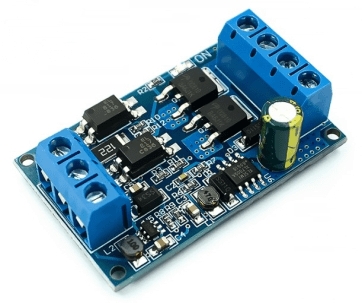
Description
What it is
The Switch MOSFET Control Module ARD0011778 allows for the management of high-power electrical devices through PWM (Pulse Width Modulation) control. The electrical coupling isolation ensures greater safety in the circuit.
Features
- High-power PWM control
- Electrical coupling isolation
- Ability to handle currents over 40A (check the datasheet)
What it is for
This module is ideal for electronic and robotics projects that require the management of high-power devices, such as LED lamps, motors, or solenoids. Compatibility with Arduino and ESP (check the datasheet) allows for easy integration into electronic control projects.
Tutorial: How to Use the High-Power Switch MOSFET Module
This module allows you to control electrical devices with power over 40A. Ideal for projects that require robust current management.
What you need
- Arduino or compatible microcontroller
- Pull-up resistor (10kΩ)
- Power supply cable
- Test load (e.g. light bulb or DC motor)
Steps
- 1. Connect the module to the microcontroller by connecting the VCC pin to 5V and GND to GND.
- 2. Connect the MOSFET pin to the PWM pin of the microcontroller.
- 3. Connect the GND pin of the device to be controlled to the GND of the module.
- 4. Connect the DRAIN pin of the device to the load.
- 5. Connect the SOURCE pin of the device to the GND of the module.
- 6. Connect the pull-up resistor between the GATE pin of the MOSFET and VCC.
- 7. Load the provided Arduino code.
- 8. Check the operation of the module.
Example code
```
void setup() {
  pinMode(9, OUTPUT);
}

void loop() {
  digitalWrite(9, HIGH);
  delay(1000);
  digitalWrite(9, LOW);
  delay(1000);
}
```
Mini project
Create an automatic lighting system. Connect a light bulb to the module and use the Arduino code to turn it on and off with a 1 second interval.
Common mistakes
- Do not use a PWM pin other than the one specified.
- Omit the pull-up resistor.
- Connect GND and VCC incorrectly.
- Do not check the device compatibility with the module.
Recommended accessories
- Arduino Uno
- 5V Bulb
- DC Motors
- Datasheet of the device to be controlled
Frequently asked questions
Does the module work with Arduino Nano?
Yes, the interface is compatible with Arduino Nano.
Which pins of the module to use?
Use the VCC, GND, MOSFET, GATE, DRAIN and SOURCE pins.
Can I use a different power supply than 5V?
Check the datasheet for power supply compatibility.
Does the module support multiple devices?
The module supports only one device at a time. To control multiple devices, use multiple MOSFETs.
Reviews
There are no reviews yet.