 EN
 IT Italiano
 ES Español
 FR Français
 DE Deutsch
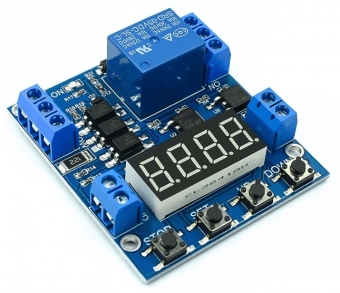
Description
What it is
The ARD0011779 timer module is an electronic component that allows for precise timing and control of activation and deactivation cycles.
Features
- SKU: ARD0011779
- Price: 8.74 €
- Features: Delay off, control on/off cycle
What it is for
This module is useful for projects that require waiting times or regular cycles. For example, it can be used to create a timer that turns an LED on and off at set intervals. It is compatible with Arduino and other microcontrollers.
Tutorial: How to use Timer Module
The Timer Module allows you to program a delay off and control on/off cycles. Useful for projects that require waiting times or regular cycles.
What you need
- Arduino IDE
- Arduino UNO or compatible
- USB cable
- 10kΩ resistor
- Power pulse (5-12V)
Steps
- 1. Download and install Arduino IDE.
- 2. Connect the Arduino UNO to your computer.
- 3. Download the provided Sketch code.
- 4. Connect the timer module to digital pin D2.
- 5. Connect the 10kΩ resistor between D2 and GND.
- 6. Power the module with VCC and GND.
- 7. Upload the code to your Arduino.
- 8. Set the on and off times in the code.
Example code
```
#include <Arduino.h>

int pinTemporizzatore = 2;

void setup() {
  pinMode(pinTemporizzatore, OUTPUT);
}

void loop() {
  digitalWrite(pinTemporizzatore, HIGH);
  delay(5000); // 5 secondi
  digitalWrite(pinTemporizzatore, LOW);
  delay(5000); // 5 secondi
}
```
Mini project
Create a timer that turns on and off an LED every 5 seconds. Connection: LED to VCC and GND, anode of the LED to D2 with a resistor.
Common mistakes
- Forget to upload the code.
- Connect the timer module to a non-digital pin.
- Power the module with incompatible voltages (5-12V).
- Forget to connect the pull-up resistor.
Recommended accessories
- LED
- Resistor for LED
- Breadboard
- Test lead
Frequently asked questions
How to set the delay time?
Modify the `delay()` function in the Sketch code.
Does the module work with Arduino Nano?
Yes, the module is compatible with Arduino Nano or any other compatible Arduino.
What are the voltage limits?
The module works with voltages from 5V to 12V.
Can I use multiple modules?
Yes, you can connect multiple timer modules to your Arduino.

Reviews
There are no reviews yet.