 EN
 IT Italiano
 ES Español
 FR Français
 DE Deutsch
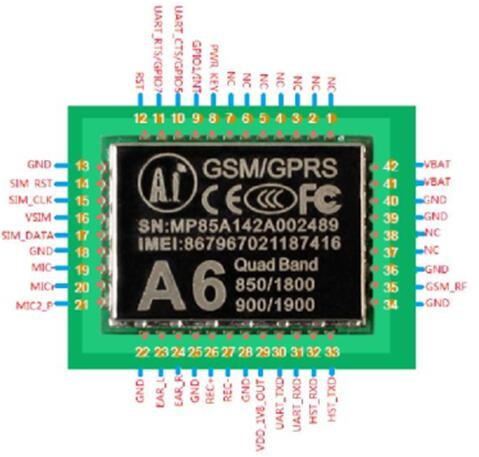
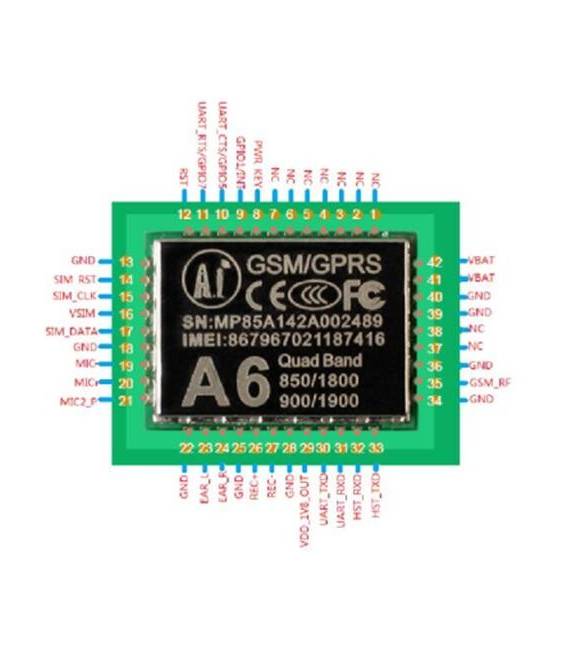
Description
What it is
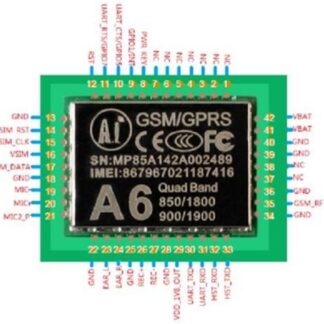
The GPRS GSM A6 Module is an electronic component that allows Arduino-based devices to connect to the internet via cellular networks.
Features
- GPRS/GSM Connection
- Sending SMS
- Managing phone calls
What it is for
The A6 module is ideal for IoT (Internet of Things) and telepresence projects. It can be used to create alarm systems that send SMS in case of activation, remote monitoring of sensors, remote control of devices, and much more. It is compatible with Arduino and other microcontrollers.
Tutorial: How to use GPRS GSM A6 Module
The GPRS/GSM A6 Module allows connection to the internet via cellular networks, enabling SMS sending and phone calls. Ideal for IoT or telepresence projects. This component is perfect for both beginners and experienced makers who want to add wireless functionality to their Arduino devices.
What you need
- Arduino Uno/Nano
- USB Connection
- Software Serial Monitor
Steps
- Connect the VCC and GND pins of the module A6 to the Arduino power supply voltage.
- Connect TX of the module to RX of the Arduino, and vice versa for bidirectional connection.
- Install the SIM800L library or similar from the Arduino IDE library manager.
- Configure the software serial pins in the Arduino sketch (e.g., SoftwareSerial myGSM(10, 11)).
- Send an AT command to check the connection to the A6 module: Serial.println(myGSM.println(“AT”));
- Check the module’s response through the serial monitor.
- If necessary, configure the access PIN and the cellular network APN in the Arduino code (check the datasheet for specific details).
- Try to send an SMS or make a call using the installed library.
Example code
// Esempio di invio di un SMS
myGSM.println("AT+CMGF=1"); // Configura il modulo per i messaggi di testo
myGSM.println("AT+CMGS=""555-1234567890""") ; // Numero di destinazione
Serial.write(26); // CTRL-Z
myGSM.println("Ciao! Prova il modulo GPRS GSM A6.");
Mini project
Create an alarm system that sends an SMS when triggered. Connect a motion sensor to the module and write an Arduino sketch to handle the automatic sending of SMS alerts.
Common mistakes
- Ensure that the A6 module is properly powered.
- Check the configuration of the PIN access and the network APN.
- Check the TX/RX connections to ensure they are inverted relative to those of the Arduino.
- Make sure you have installed the correct library for the A6 GPRS/GSM module.
Recommended accessories
- Batteries or external power supply
- Separate GSM antenna
- Wireless sensors
- LCD display
Frequently asked questions
How can I tell if my module is correctly configured?
Check the module’s response when you send an AT command. If it responds with ‘OK’, then it is correctly configured.
What is the cost of using this module for SMS and GPRS communications?
Costs vary depending on the mobile operator and country. Check your mobile network tariff plan.
Reviews
There are no reviews yet.