 EN
 IT Italiano
 ES Español
 FR Français
 DE Deutsch
Description
What it is
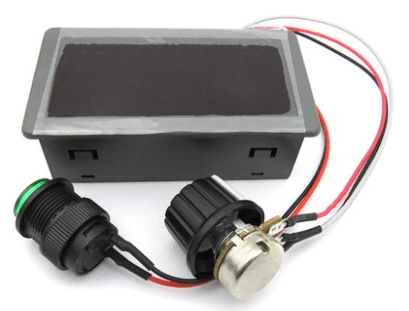
The CCM5D Digital Display and the CC PWM Motor Speed Controller are useful components for controlling DC motors from 6 to 24V. These devices are designed to monitor and regulate the speed of motors in various electronic devices.
Features
- CCM5D Digital Display
- CC PWM Motor Speed Controller
- Compatible with power supply voltages from 6V to 24V
- Continuous speed control switch
- Controller display housing
What it is for
The CCM5D components and the PWM regulator are ideal for Arduino projects, 3D printing, and drones that require precise motor speed control. They are useful for building small RC drones with speed control adjustable via the CCM5D display. Additionally, they can be used with a DC motor and a propeller for movement.
Tutorial: How to use CCM5D Digital Display with PWM Speed Controller
The CCM5D digital display is a useful component for monitoring and adjusting the speed of DC motors in various electronic devices. It is ideal for Arduino projects, 3D printing, and drones that require precise speed control.
What you need
- Arduino Uno
- USB Cable
- 6V-24V Battery
- Trainable Connections
- Digital Display CCM5D
Steps
- Connect the CCM5D display to the Arduino using the trainable connectors.
- Configure the display power supply with the 6V-24V battery.
- Program the Arduino to read speed commands.
- Adjust the speed of the DC motor via the display.
- Check the motor speed via the digital display.
- Install a button to increase or decrease the speed.
- Test the entire system with various speed levels.
- Add an option to turn the display on and off.
Example code
void setup() { Serial.begin(9600); } void loop() { if (Serial.available()) { int speed = Serial.parseInt(); analogWrite(9, speed); } }Mini project
Create a small RC drone with adjustable speed control via the CCM5D display. Use a DC motor and a drone propeller for movement.
Common mistakes
- Connection error between the display and the Arduino.
- Incorrect power supply voltage setting.
- Speed command reading issues.
- Incorrect display PWM configuration.
Recommended accessories
- DC motor
- Drone propeller
- 11.1V battery
- Control button
Frequently asked questions
How can I check the motor speed?
Use the CCM5D display to monitor the speed in real-time.
What is the minimum power supply voltage for the display?
Check the product datasheet.
Reviews
There are no reviews yet.