 EN
 IT Italiano
 ES Español
 FR Français
 DE Deutsch
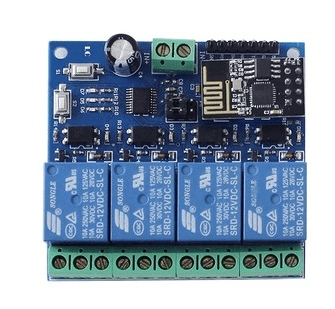
Description
What it is
DC12V ESP8266 Wi-Fi Relay Module with Four Channels is a device that allows remote control of DC12V devices via Wi-Fi connection and a mobile app. It integrates an ESP8266 module for Wi-Fi connection management and control of the four relay channels.
Features
- Four relay channels
- DC12V Power Supply
- Integrated ESP8266 module
- Remote control via mobile app
- Compatibility with IoT and smart home systems
What it is for
This Wi-Fi relay is ideal for creating remote control systems for home devices such as lights, appliances, or security systems. It can be used to automate processes, create custom lighting scenarios, or monitor the status of devices from a distance. Compatibility with Arduino and other ESP8266 microcontrollers allows it to be integrated into more complex projects.
Tutorial: How to use DC12V ESP8266 Wi-Fi Relay Module with Four Channels
This Wi-Fi relay allows you to control electronics remotely via a mobile app. Ideal for smart home projects.
What you need
- DC12V ESP8266 Relay
- Arduino or compatible microcontroller
- 12V power supply cable
- Ground cable
- Wi-Fi antenna
- Mobile app for smartphone
Steps
- 1. Ensure the power supply is 12V.
- 2. Connect the relay to the microcontroller: VCC to 5V, GND to ground.
- 3. Connect the relay channels (CH1-CH4) to digital pins on the microcontroller.
- 4. Connect the Wi-Fi antenna to the relay.
- 5. Upload the Arduino code to an Arduino.
- 6. Configure the mobile app to connect to the relay.
- 7. Check the Wi-Fi connection via the serial console.
- 8. Check the app interface to control the channels.
Example code
```
#include <ESP8266WiFi.h>

const char* ssid = "nomeSSID";
const char* password = "passwordSSID";

void setup() {
  Serial.begin(115200);
  WiFi.begin(ssid, password);
  delay(5000);
  Serial.println(WiFi.status());
}

void loop() {}
```
Mini project
Create a remote lighting system using the app to control 4 lights.
Common mistakes
- Incorrect power supply (not 12V). Check the datasheet.
- Incorrect connection between relay and microcontroller. Check schematics.
- Unstable Wi-Fi connection. Check Wi-Fi signal.
- App not configured correctly. Check app instructions.
Recommended accessories
- Arduino UNO
- USB cable
- LED light
- Bulb
Frequently asked questions
How can I check the Wi-Fi connection?
Check the serial console or app interface.
Which pins are available for channels?
Use digital pins D2, D3, D4, D5 for channels 1-4.
What are the minimum power supply requirements?
Minimum power supply 12V, maximum 15V.
Can I use this relay with an Arduino from another brand?
Check pin and power supply compatibility.

Reviews
There are no reviews yet.