 EN
EN IT Italiano
 ES Español
 FR Français
 DE Deutsch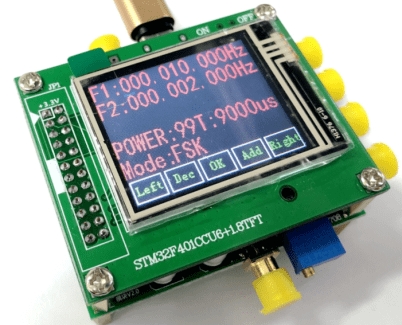
Description
What is the DDS AD9854 Module? The DDS AD9854 module is an Arduino development board that functions as a versatile digital signal generator. It allows for the creation of high-precision sinusoidal signals ideal for testing, prototyping and RF communication applications. Features Frequency sweep support FSK and PSK Open source Use Cases This module is useful for generating precise sinusoidal signals for various applications including: electronic test and measurement, RF communication projects and circuit prototyping. Its compatibility with Arduino makes it easy to integrate into projects based on this platform. Tutorial How to use the DDS AD9854 Module The DDS AD9854 module is a digital signal generator that enables the creation of high-precision sinusoidal signals. It is ideal for RF communication projects, electronic test and measurement tasks, and anyone who wants to precisely control frequency and waveform. What you need Arduino Uno or compatible USB cable 5V power connection Arduino IDE Steps Connect the DDS AD9854 module to the Arduino using appropriate connectors. Load the example sketch provided on the DDS AD9854 module. Configure the desired frequency in the Arduino code. Ensure that the DDS AD9854 module is correctly powered. Monitor the serial console to verify that the DDS AD9854 module is generating the correct signal. Modify the code to explore further features of the module, such as FSK, PSK, etc. Test the module with various types of signals (sinusoidal, square, triangular, etc.). Explore the documentation for advanced features and optimisations. Example Sketch /* Example sketch for the DDS AD9854 Module Configures frequency and sends commands to the module */ #include DDS_AD9854 dds; void setup() { Serial.begin(9600); dds.begin(9600); dds.setFrequency(1000000); // Set frequency to 1 MHz } void loop() { // Add code here to change the frequency or signal parameters } Mini Project Create a simple RF signal generator to transmit FSK signals at 433 MHz. Connect the DDS AD9854 module to an RF transmitter and modulate the frequency to transmit binary data. Common Errors Ensure that the DDS AD9854 module is correctly powered. Check that connectors are securely connected. Verify that the set frequency is within the supported range of the module.

Reviews
There are no reviews yet.