 EN
 IT Italiano
 ES Español
 FR Français
 DE Deutsch
Description
What it is
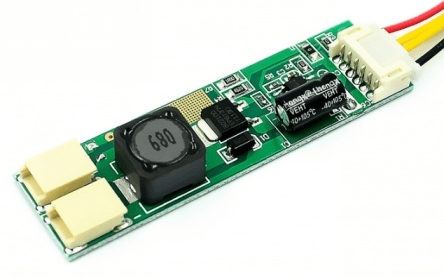
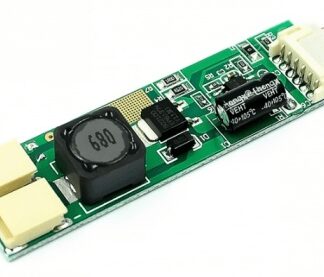
The ARD0011774 board is a buck power supply for LEDs with a 9.6V output. It allows adjusting the brightness of LEDs through constant current control.
Features
- LED Buck Power Supply 9.6V
- Dimmable
- Constant Current Source
- SKU: ARD0011774
- Price: 2.87 €
What it is for
The board is ideal for controlling the brightness of LEDs or groups of LEDs. It can be used in programmable lighting projects or to add a touch of personalization to electronic devices. It is compatible with Arduino and other microcontrollers.
Tutorial: How to use the 9.6V Dimmable LED Constant Current Board
The 9.6V dimmable LED constant current board is ideal for controlling the brightness of LEDs or groups of LEDs. It is perfect for programmable lighting projects and for makers who want to add a touch of personalization to their devices.
What you need
- 9.6V Constant Current LED Dimming Board
- Arduino
- LED
- Connection Cables
- Resistors
- Clamping Diodes (optional)
Steps
- Connect the vin of the Arduino to the vcc of the LED dimming board.
- Connect the 5V of the Arduino to the control pin of the LED dimming board.
- Connect the ground of the Arduino to the gnd of the LED dimming board.
- Connect the control pin of the LED dimming board to a digital pin of the Arduino.
- Connect the LEDs to the LED dimming board according to the datasheet specifications.
- Check the correct resistance for the connected LEDs.
- Check the polarity of the LEDs.
- Upload the Arduino sketch to control the brightness of the LEDs.
Example code
void setup() {
  pinMode(9, OUTPUT);
}

void loop() {
  analogWrite(9, 128);
  delay(1000);
  analogWrite(9, 255);
  delay(1000);
}
Mini project
Create a programmable lighting system for a smart home with the 9.6V LED dimming board. Control the brightness of the LEDs through an Arduino program.
Common mistakes
- Connect the control pin to the wrong voltage.
- Do not check the correct resistance for the LEDs.
- Do not check the polarity of the LEDs.
- Do not check the power supply voltage of the board.
Recommended accessories
- Variable resistors
- Relays
- Light sensors
- Wireless communication modules
Frequently asked questions
How do you adjust the brightness of the LEDs?
Use the analogWrite() function to adjust the brightness of the LEDs.
Which LEDs are compatible with this board?
Check the datasheet for LED compatibility.
Can I use more LEDs?
Yes, but check the maximum current of the board and the correct resistance.
Reviews
There are no reviews yet.