 EN
 IT Italiano
 ES Español
 FR Français
 DE Deutsch
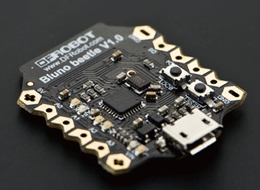
Description
What it is
The Bluno Beetle BLE Controller is an Arduino module for wireless Bluetooth connections. It allows adding wireless communication features to Arduino projects.
Features
- Bluetooth Low Energy (BLE) Connection
- Compatible with Android and iOS devices
- Compact dimensions
- Arduino-compatible interface
What it is for
The Bluno Beetle is ideal for IoT projects, wireless sensor applications, and remote control applications. You can use it to create temperature, humidity, pressure, and other environmental parameter sensors. The collected data can be sent to your smartphone or tablet via the Bluetooth app. It is suitable for beginner and intermediate makers who want to explore wireless communication.
Tutorial: How to use the Bluno Beetle BLE Controller
The Bluno Beetle BLE Controller is a small Bluetooth Low Energy (BLE) module designed to connect to Android or iOS devices. Ideal for IoT and wireless sensor projects, it is perfect for beginner and intermediate makers who want to explore wireless communication.
What you need
- Arduino IDE
- Computer with Bluetooth
- USB cable
- Battery (optional)
Steps
- Install the Bluno BLE library in the Arduino package manager
- Connect the Bluno Beetle to the computer via USB
- Load the example sketch provided by the library
- Open the Bluno app on smartphone/tablet
- Connect to the Bluno Beetle via the app
- Send commands from the mobile device
- Verify data reception on the Arduino serial monitor
- Configure the Bluno Beetle for autonomous operation mode (check the datasheet)
Example code
void setup() {
  BLE.begin();
  BLE.println("Hello World");
}

void loop() {
  BLE.println(analogRead(A0));
  delay(1000);
}
Mini project
Create a wireless temperature sensor: connect a DS18B20 sensor to the Bluno Beetle and transmit real-time temperature data to your smartphone.
Common mistakes
- I cannot connect to the Bluno Beetle
- The code does not upload correctly
- I do not receive data from the sensor
- The Bluno Beetle does not charge via USB
Recommended accessories
- DS18B20 Sensor
- LiPo Battery
- Relay Module
- LCD Display
Frequently asked questions
How can I upload the firmware to the Bluno Beetle?
Use the Bluno software provided on the official website.
Which devices does it support?
Supports Android and iOS devices.
Reviews
There are no reviews yet.