 EN
 IT Italiano
 ES Español
 FR Français
 DE Deutsch
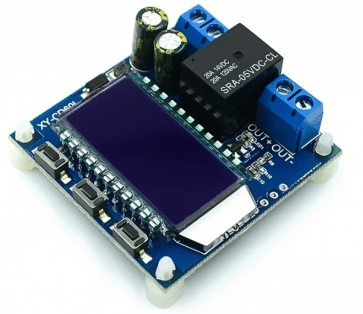
Description
What it is
The CD60L module is an integrated circuit that monitors battery charge and provides under-voltage and CC voltage drop protection. It is designed to be used in electronic applications that require precise battery charge management.
Features
- Battery charge monitoring
- Under-voltage protection
- CC voltage drop protection
- SKU: ARD0011936
- Price: 8.98 €
What it is for
The CD60L module is ideal for protecting and properly managing battery charge in electronic projects such as drones, robots, and portable systems. It can be used to ensure safe and reliable operation of battery-powered devices.
Tutorial: How to use CD60L Battery Control Module
The CC/CD60L module is a crucial component for protecting and properly managing the charge of your battery. Ideal for projects that require accurate charge management, such as drones, robots, and portable systems.
What you need
- Arduino Uno
- LiPo Battery 3S
- JST Connections
- USB Cable
- Multimeter
Steps
- Connect the CC/CD60L module to the battery using the JST connector.
- Connect the VCC and GND pins of the module to the power circuit.
- Connect the CHRG pin to a digital pin on the Arduino for charge control.
- Check the operating voltage on the module’s datasheet.
- Write an Arduino sketch to monitor the battery voltage.
- Program the module to automatically turn off when the battery reaches the minimum voltage.
- Test the system with a light load.
- Verify that the module properly shuts off when the voltage drops to the protection level.
Example code
void setup() {
  pinMode(CHRG, INPUT);
  Serial.begin(9600);
}

void loop() {
  int chargeStatus = digitalRead(CHRG);
  Serial.println(chargeStatus);
}
Mini project
Drone prototype project: build a small drone with the CC/CD60L module to protect the battery during flight.
Common mistakes
- Do not verify the minimum protection voltage.
- Do not correctly connect the CHRG pins.
- Do not test the system before use.
- Do not update the Arduino sketch to fit your project.
Recommended accessories
- LiPo Battery 3S
- JST Connections
- Multimeter
- Arduino Uno
Frequently asked questions
How can I control the battery voltage?
Use an Arduino sketch to read the CHRG pin and monitor the voltage.
What batteries can I use with this module?
Check the module’s datasheet for battery compatibility.
How can I configure the module to turn off the battery?
Program the undervoltage protection level in your Arduino sketch.
Reviews
There are no reviews yet.