 EN
 IT Italiano
 ES Español
 FR Français
 DE Deutsch
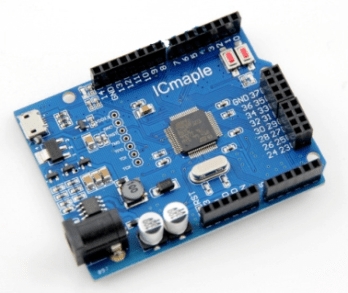
Description
What it is
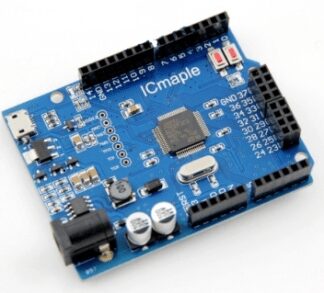
Leaf Maple is an Arduino-compatible device designed for makers. It allows for the development and testing of electronic projects. It is also a humidity and temperature sensor suitable for both indoor and outdoor projects.
Features
- Arduino Compatible
- Humidity and Temperature Sensor
What it is for
The Leaf Maple is useful for monitoring environmental conditions. It can be used to create automatic irrigation systems for indoor plants based on the humidity data provided by the sensor.
Tutorial: How to Use Leaf Maple
The Leaf Maple is a humidity and temperature sensor ideal for indoor and outdoor projects. It is useful for anyone who wants to monitor environmental conditions.
What you need
- Leaf Maple
- Arduino UNO or Compatible
- 5V Power Cable
- Multimeter (optional)
Steps
- 1. Installation: Assemble the Leaf Maple on your circuit.
- 2. Connection: Connect to pin A0 of Arduino.
- 3. Power Supply: Power the Leaf Maple with 5V.
- 4. Verification: Use the multimeter to check the current.
- 5. Code: Load the following sketch.
- 6. Test: Check the humidity and temperature values.
- 7. Configuration: Adapt the code to your needs.
- 8. Monitoring: Connect the Leaf Maple to a display to visualize the data.
Example code
```
#include <Wire.h>
#include <Adafruit_Sensor.h>
#include <Adafruit_BME280.h>

Adafruit_BME280 bme;

void setup() {
  Serial.begin(9600);
  if (!bme.begin(0x76)) {
    Serial.println("Could not find a valid BME280 sensor, check wiring!" );
    while (1); // halt
  }
}

void loop() {
  float temperature = bme.readTemperature();
  float humidity = bme.readHumidity();
  Serial.print("Temp = ");
  Serial.print(temperature);
  Serial.print(" *C Humidity = ");
  Serial.print(humidity);
  Serial.println(" %");
  delay(2000);
}
```
Mini project
Create an automatic irrigation system for indoor plants using the humidity data provided by the Leaf Maple.
Common mistakes
- Do not connect the Leaf Maple to an unsupported pin.
- Forget the power supply.
- Do not verify connectivity.
- Use an incompatible Arduino.
Recommended accessories
- LCD Display
- Pump
- Electromechanical Valve
- Light Sensors
Frequently asked questions
How can I verify the connectivity of the Leaf Maple?
Check the connection with a multimeter or verify the presence of signal on pin A0.
Can I use Leaf Maple with an Arduino Mega?
Check the datasheet to see if the Leaf Maple is compatible with the Arduino Mega.
What are the supported temperature and humidity limits?
Check the datasheet for supported temperature and humidity limits.
Reviews
There are no reviews yet.