 EN
 IT Italiano
 ES Español
 FR Français
 DE Deutsch
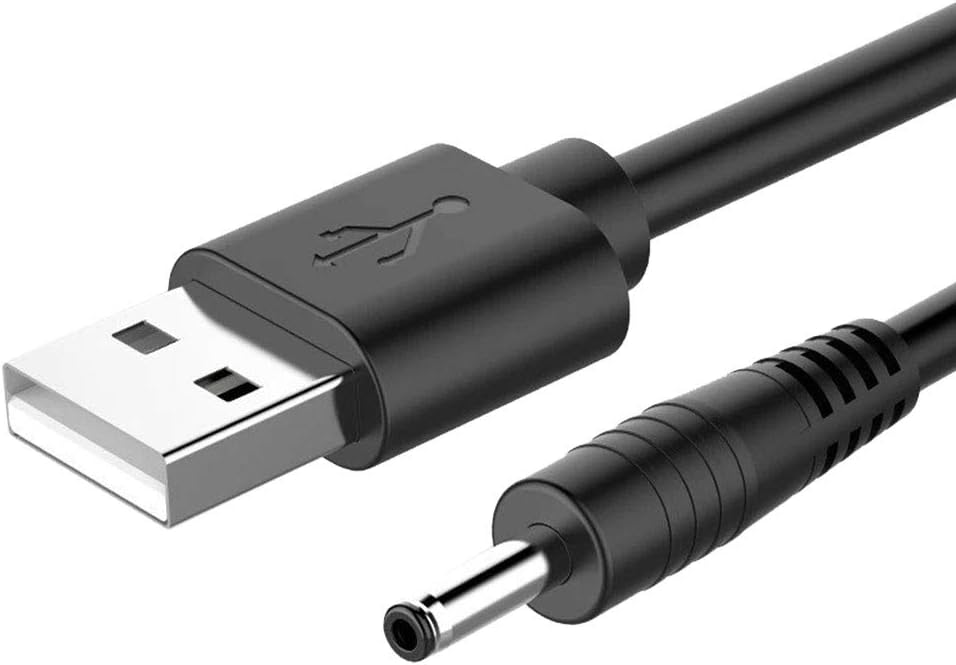
Description
Tutorial: How to use USB to 3.5mm DC Jack Power Supply Cable, 80cm
This cable allows you to power electronic devices that use a 3.5mm DC jack, such as small electronic prototypes or sensors, from a USB power supply. Ideal for those just starting with Arduino and electronics.
What you need
- USB to 3.5mm DC Jack Power Supply Cable
- Arduino or electronic device with a 3.5mm DC jack
- USB power supply
Steps
- Check that the cable has one end USB and one end 3.5mm DC jack.
- Connect the USB end to the computer’s USB port or to a USB power supply.
- Insert the 3.5mm DC jack end into the device’s power supply jack.
- Verify that the device receives the correct power by checking the device’s datasheet for the required voltage and current.
- If necessary, adjust the power supply according to the device specifications.
- Check that the device functions correctly without interruptions or overloads.
Mini project
Create a simple light sensor prototype with Arduino that turns on and off based on ambient light.
Common mistakes
- Do not verify the voltage and current required by the device.
- Connect the cable incorrectly (reversed polarity).
- Do not check that the device receives power correctly.
- Use a voltage higher than what the device requires.
Recommended accessories
- Arduino Uno R3
- Light sensors
- DC power supply with 3.5 mm jack
- USB A to micro USB cable
Frequently asked questions
What is the length of the cable?
The cable has a length of 80 cm.
What is the output voltage of the cable?
Check the device’s datasheet.
Can it be used with any device?
No, it must be verified that the device accepts a 3.5 mm DC jack and the voltage provided by the cable.

Reviews
There are no reviews yet.