 EN
 IT Italiano
 ES Español
 FR Français
 DE Deutsch
Description
Technical Specifications
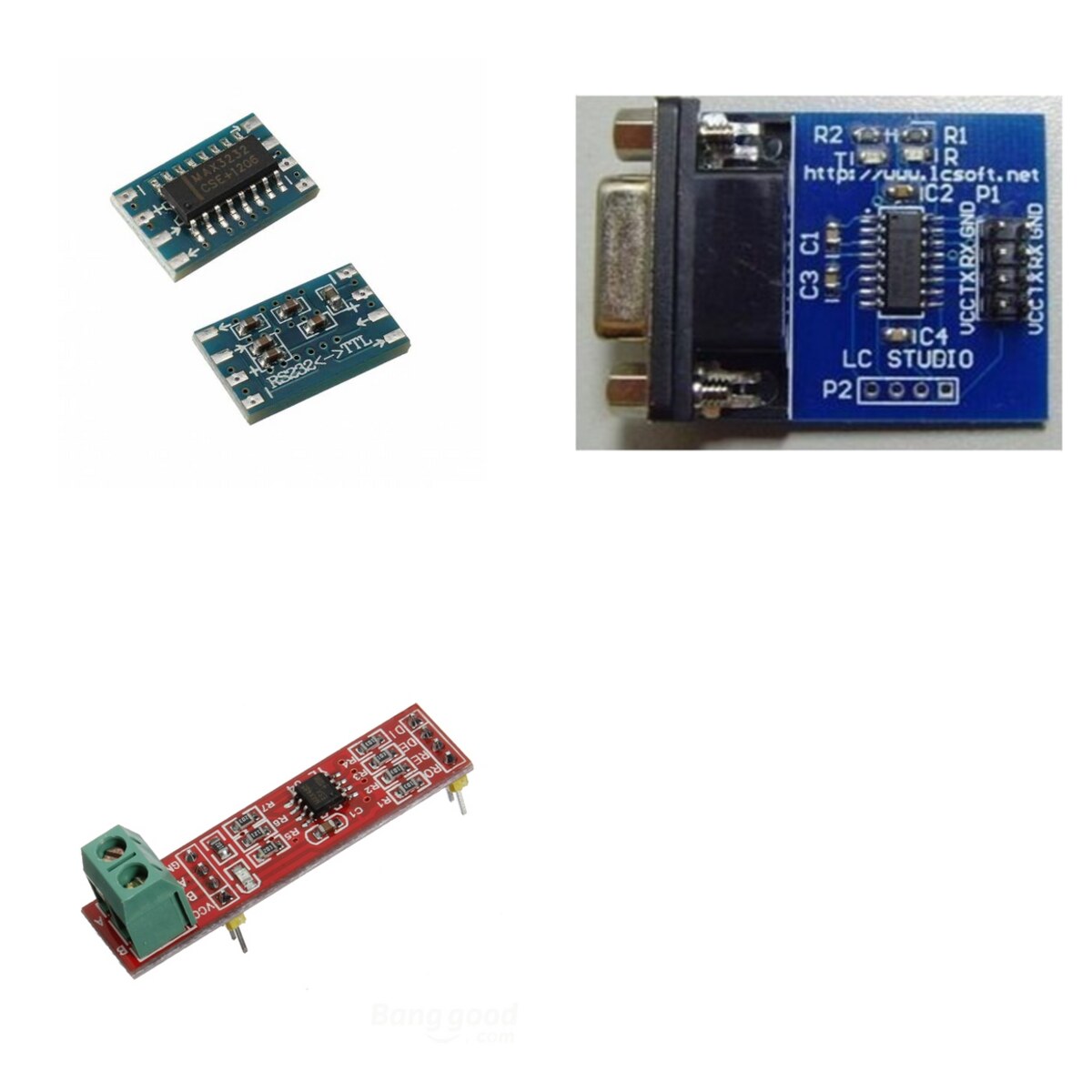
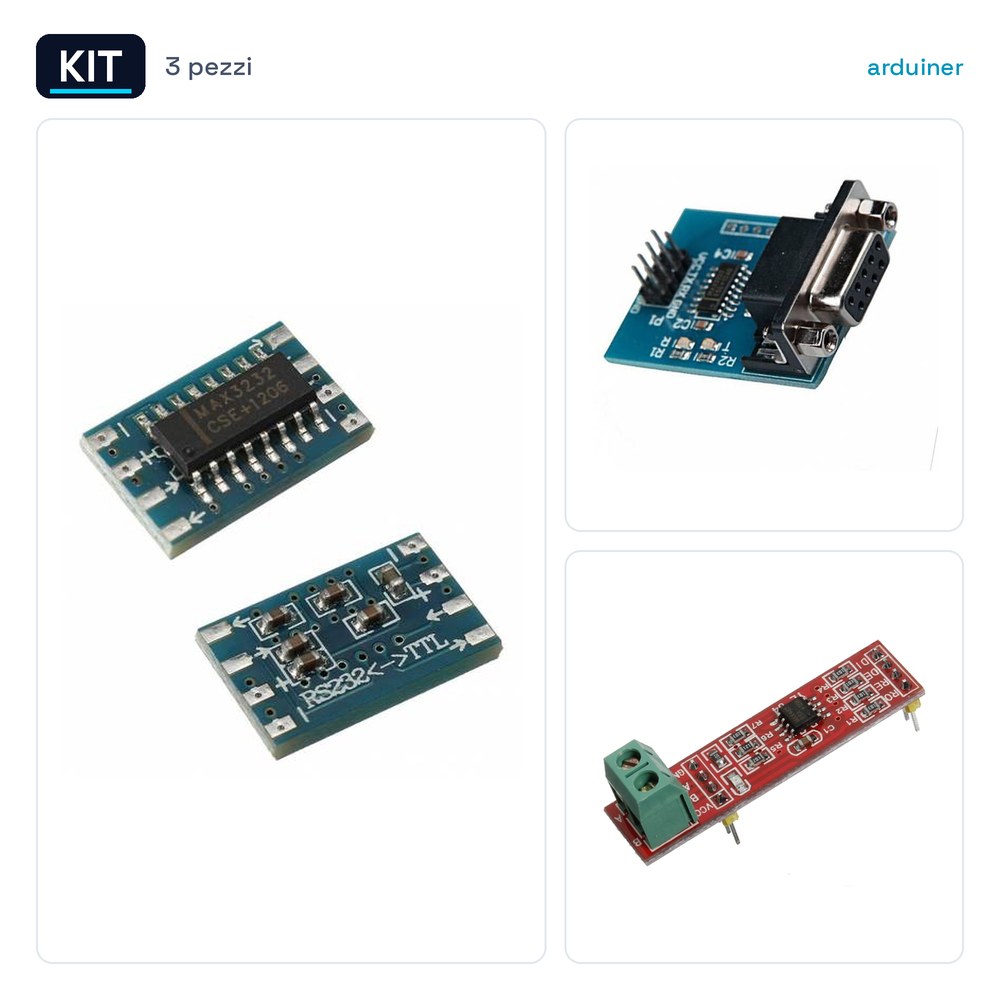
The Mini Serial Converter Kit from RS232 to TTL with MAX3232CSE, RS232 Serial Converter and MAX485 RS485 Converter Module is an essential package of components for serial communication in electronic projects and prototyping. This kit includes an RS232 to TTL converter based on MAX3232CSE, an RS232-TTL serial interface module and a TTL to RS485 conversion module. Each component is designed to facilitate serial communication between devices such as Arduino and other microcontrollers.
The RS232 to TTL converter uses the MAX3232CSE chip to convert the RS232 signal to TTL, allowing communication with devices that require a TTL logic level. The RS232-TTL serial interface module enables bidirectional serial communication, while the MAX485 RS485 module offers a long-distance serial communication solution with a TTL logic level.
These components are essential for projects that require serial communication between different devices, such as data transmission between a microcontroller and a computer or between long-distance network devices.
Key Specifications
| Parameter | Value |
| RS232 to TTL Model | MAX3232CSE |
| Quantity RS232 to TTL | 1 |
| Serial Converter RS232 Model | N/D (see manufacturer’s datasheet) |
| Quantity Serial Converter RS232 | 1 |
| MAX485 Converter Module Model | N/D (see manufacturer’s datasheet) |
| Quantity MAX485 Converter Module | 1 |
| RS232 to TTL Interface | DB9 |
| Serial RS232 Converter Interface | N/D (see manufacturer’s datasheet) |
| RS232 Converter Module Interface | N/D (see manufacturer’s datasheet) |
| Container | N/D (see manufacturer’s datasheet) |
Installation and Usage
- Connect the RS232 to TTL converter to the source device via the DB9 interface.
- Connect the RS232-TTL serial interface module to the RS232 to TTL converter.
- Connect the MAX485 RS485 module to the RS232-TTL serial interface module.
- Power the RS232 to TTL converter with a 5V supply.
- Perform a serial communication test between the connected devices.
Compatibility and Requirements
- This kit is compatible with Arduino and other microcontrollers that use the RS232 serial interface.
- A serial communication software is required to manage the communication between the microcontroller and the computer.
- For RS485 communication, another network device that supports RS485 communication is necessary.
Limitations and Important Notes
- The kit does not include specific connectors for the RS485 interface.
- RS485 communication requires another compatible RS485 network unit.
- Ensure the correct power supply voltage is used to avoid component damage.
- RS485 communication requires a traffic control protocol to prevent collisions.
Troubleshooting
The RS232 to TTL converter does not respond.
Probable cause: Unstable connection or insufficient power supply.
Solution: Check the connections and power supply voltage.
RS485 communication does not work.
Probable cause: Incorrect MAX485 module configuration.
Solution: Check the MAX485 module configuration and network device compatibility.
The RS232-TTL serial interface module does not work.
Probable cause: Incorrect interface or wrong connection.
Solution: Verify interface compatibility and connections.
The RS232 to TTL converter overheats.
Probable cause: Excessive power supply or device overload.
Solution: Check the power supply voltage and reduce the device load.
Use cases
Home temperature sensor
Objective: Monitor real-time temperature.
What is needed: RS232 to TTL converter.
Steps: 1) Connect the temperature sensor to the RS232 to TTL converter. 2) Connect the converter to the microcontroller. 3) Configure the microcontroller for serial communication.
Expected result: The temperature is monitored and sent to the microcontroller.
Access Control System
Objective: Control access based on serial data.
What’s needed: RS232-TTL interface module.
Steps: 1) Connect the RS232-TTL interface module to the access control system. 2) Configure the system for serial communication. 3) Test the serial communication.
Expected result: The access control system works correctly.
Industrial Monitoring System
Objective: Monitor production data.
What’s needed: MAX485 RS485 module.
Steps: 1) Connect the MAX485 module to the monitoring system. 2) Configure the system for RS485 communication. 3) Test the RS485 communication.
Expected result: Production data is monitored and sent to the system.
Light Control System
Objective: Control lights via serial data.
What’s needed: RS232 to TTL converter.
Steps: 1) Connect the RS232 to TTL converter to the lighting control system. 2) Configure the system for serial communication. 3) Test the serial communication.
Expected result: The lights can be controlled via serial data.
Environmental Conditions Monitoring System
Objective: Monitor environmental conditions such as temperature and humidity.
What’s needed: RS232-TTL interface module.
Steps: 1) Connect the serial interface module to the monitoring system. 2) Configure the system for serial communication. 3) Test the serial communication.
Expected result: Environmental conditions are monitored and sent to the system.
Electronic Lock Control System
Objective: Control electronic locks via serial data.
What’s needed: MAX485 RS485 module.
Steps: 1) Connect the MAX485 module to the door lock control system. 2) Configure the system for RS485 communication. 3) Test RS485 communication.
Expected result: Electronic locks can be controlled via serial data.
Security Conditions Monitoring System
Objective: Monitor security conditions such as alarms.
What’s needed: RS232-TTL interface module.
Steps: 1) Connect the serial interface module to the monitoring system. 2) Configure the system for serial communication. 3) Test serial communication.
Expected result: Security conditions are monitored and sent to the system.
Electronic Door Control System
Objective: Control electronic doors via serial data.
What’s needed: RS232 to TTL converter.
Steps: 1) Connect the RS232 to TTL serial converter to the door control system. 2) Configure the system for serial communication. 3) Test the serial communication.
Expected result: The electronic doors can be controlled via serial data.
In the package
- 3 pieces
Complete the project
- RS232 to TTL Serial Interface Converter Module: For USB to TTL serial communication.
- : USB 2.0 to TTL/RS232 TTL UART Adapter 6 Pin with CH340G chip for serial communication.: For RS232 to TTL serial communication.
- : USB 2.0 to TTL/RS232 TTL UART Adapter 5 Pin with CH340G chip for serial communication.: For RS485 to TTL serial communication.
- : USB to RS232 Serial Converter Cable DB9 9 pin: For RS232 to RS485 serial communication.
Technical FAQs
What is the power supply voltage for the RS232 to TTL converter?
The power supply voltage for the RS232 to TTL converter is 5V.
How do you configure the MAX485 RS485 module?
The configuration of the MAX485 RS485 module depends on the network device it is connected to. Consult the network device documentation for configuration instructions.
Is the RS232 to TTL converter compatible with Arduino?
Yes, the RS232 to TTL converter is compatible with Arduino and other microcontrollers that use the RS232 serial interface.
What issues can occur during RS485 communication?
Common issues during RS485 communication include incorrect MAX485 module configuration and data collisions due to improperly configured traffic control protocols.
Reviews
There are no reviews yet.