 EN
 IT Italiano
 ES Español
 FR Français
 DE Deutsch
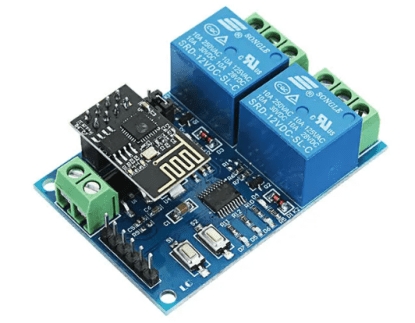
Description
What it is
The Double Relay WiFi ESP8266 5V Module is an electronic device that allows controlling electrical devices via a WiFi connection. It can be used to create home automation systems and IoT projects.
Features
- Double relay
- WiFi connection
- 5V power supply
- Compatibility with Arduino (check the datasheet)
- Compatibility with ESP8266 (check the datasheet)
What it is for
The module can be used to control lights, appliances, and other electrical devices remotely via a mobile app. It is ideal for home automation projects, such as turning lights on and off based on a timer or a motion detector. It can also be used to monitor and control remote devices in industrial or agricultural settings.
Tutorial: How to use Double Relay WiFi ESP8266 5V Module
The ESP8266 5V WiFi Double Relay Module allows you to control electrical devices remotely using a WiFi connection. Ideal for IoT and home automation projects.
What you need
- ESP8266 5V WiFi Double Relay Module
- Arduino IDE
- Computer with WiFi connection
- USB pin to connect the module to the PC
- Mobile device for the control app
Steps
- Install the Arduino IDE and the necessary driver for the ESP8266 module.
- Download and install the ESP8266WiFi library.
- Connect the ESP8266 module to the computer via the USB pin.
- Configure the ESP8266 module with your router’s WiFi credentials.
- Load the example sketch provided with the ESP8266WiFi library.
- Install the control app on your mobile device.
- Configure the app with the ESP8266 module information.
- Test the module by controlling the relays through the mobile app.
Example code
/*
Controlla i relè tramite WiFi.
*/
#include <ESP8266WiFi.h>

const char* ssid = "SSID";
const char* password = "PASSWORD";

// Verifica sul datasheet per i pin specifici del modulo
void setup() {
  Serial.begin(115200);
  WiFi.begin(ssid, password);
  while (WiFi.status() != WL_CONNECTED) {
    delay(500);
    Serial.print(".");
  }
  Serial.println("WiFi connected");
}

void loop() {
  // Verifica sul datasheet per le istruzioni specifiche del modulo
}
Mini project
Create an outdoor light control system that turns on and off via a mobile app. Set a timer to automatically turn on the light at night.
Common mistakes
- WiFi configuration error.
- Connection problems between the mobile app and the ESP8266 module.
- Incorrect pin settings for the module.
- Problems uploading the sketch to ESP8266.
Recommended accessories
- Arduino Uno
- Motion sensors
- WiFi socket to control electrical devices
- Backup batteries for the ESP8266 module
Frequently asked questions
How can I configure the module?
Follow the tutorial steps to configure the ESP8266 module with your WiFi credentials.
Can it control 220V devices?
Yes, but use an isolated transformer or a separate relay to manage 220V circuits.
Reviews
There are no reviews yet.