 EN
 IT Italiano
 ES Español
 FR Français
 DE Deutsch
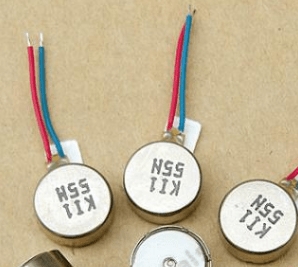
Description
What it is
Vibration motor for use in small electronic devices. Operates at variable voltage between 3V and 5V DC and has compact dimensions of 8×3.4mm.
Features
- Operating Voltage: 3V-5V DC
- Dimensions: 8×3.4mm
What it is for
This motor can be integrated into electronic projects to provide tactile feedback. It is ideal for alarms, notifiers, and user interfaces that require a tactile signal. It can be used with Arduino and other compatible microcontrollers.
Tutorial: How to Use Vibration Motor 0834 3V-5V DC
The vibration motor 0834 3V-5V DC is perfect for adding tactile feedback to your projects. It is particularly useful for alarms, notifiers, and user interaction applications.
What you need
- Vibration Motor 0834 3V-5V DC
- Arduino Uno or compatible
- Head Connectors
- Power Supply 3V-5V
- Connection Cable
- Multimeter
Steps
- Check the motor power supply voltage on the datasheet and connect the power adapter to the motor.
- Use the multimeter to verify the correct connection.
- Connect the motor to the Arduino output pin.
- Write an Arduino sketch to control the motor.
- Upload the sketch to your Arduino.
- Verify that the motor vibrates when the Arduino pin is high.
- Modify the sketch to control the duration of the vibration.
- Test the motor with different voltage levels to understand its behavior.
Example code
void setup() {
  pinMode(13, OUTPUT);
}

void loop() {
  digitalWrite(13, HIGH);
  delay(500);
  digitalWrite(13, LOW);
  delay(500);
}
Mini project
Create a simple alarm that vibrates when a motion detector is triggered. You can use a PIR Sensor to start the motor vibration.
Common mistakes
- Do not verify the correct power supply voltage.
- Do not connect the pins correctly.
- Do not test the motor before integrating it into the project.
- Do not add a current limiting resistor.
Recommended accessories
- PIR Sensor
- Resistor
- LCD Display
- Buzzer
Frequently asked questions
The motor does not vibrate.
Check the power supply voltage and correct pin connections.
How can I adjust the vibration duration?
Modify the delay value in the Arduino sketch.
Can it be used with a battery?
Yes, check the motor power supply voltage on the datasheet and ensure the battery provides the correct voltage.
Reviews
There are no reviews yet.