 EN
EN IT Italiano
 ES Español
 FR Français
 DE Deutsch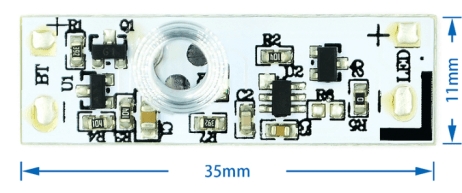
Description
What is the ARD0011920 touch sensor switch? The ARD0011920 is a device designed to automatically regulate light in light bars and wardrobes. This smart touch switch allows you to control lights or light bars automatically, improving energy efficiency and intelligent use of lighting. Features – Touch Sensor Light Switch for Wardrobe – Opening and Closing Light Bar Switch – Smart Touch Switch Check the datasheet for detailed technical specifications What is it used for? This touch sensor switch is ideal for beginners and intermediate makers. You can use it to create an automatic lighting system for a work corner, connecting it to Arduino or another compatible platform. The lighting turns on when the touch sensor is touched. Tutorial: How to Use the Smart Touch Switch ARD0011920 This smart touch switch is ideal for automatically controlling lights or light bars. Perfect for beginners and intermediate makers. What you need – Arduino IDE – 10kΩ Resistor – 5V Power Cable Steps 1. Download and install the Arduino IDE. 2. Connect the ARD0011920 to your Arduino using pins D2 and GND. 3. Connect a 10kΩ resistor between pin VCC and GND. 4. Upload the following code to the Arduino. 5. Connect the 5V power cable. 6. Turn on the Arduino. 7. Check if the switch responds to touch. 8. Refer to the datasheet for further details. Example Code “`cpp #include int touchPin = 2; void setup() { pinMode(touchPin, INPUT); } void loop() { if (digitalRead(touchPin) == HIGH) { Serial.println(“Interruttore toccato”); } } “` Mini-project Create an automatic lighting system for a work corner. Connect the switch to Arduino and a light bar. The lighting turns on when the touch sensor is touched. Common mistakes Not connecting pins correctly. Forgetting to upload code. Powering Arduino with voltage other than 5V. Failing to check the datasheet for further details. Recommended accessories – Light Bar – Bulb – Arduino – 10kΩ Resistor Frequently Asked Questions How can I verify if the switch works? Touch the switch and check if the Arduino prints “Interruttore toccato” in the serial monitor. Can I use any model of Arduino? Yes, the code works on any Arduino compatible with the IDE.

Reviews
There are no reviews yet.