 EN
EN IT Italiano
 ES Español
 FR Français
 DE Deutsch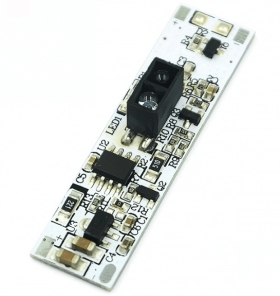
Description
What is the Manual Scan Sensor Dimmer Switch XK-GK-1247-B? This device allows you to adjust the brightness with a touch. It’s designed to be integrated into drawer doors or other electronic projects. Features: Manual scan sensor, dimmer control, detection range 5-7 cm SKU: ARD0011922 Price: £2.74 What is it for? This switch can be used to automate the opening of drawers or doors with a simple touch. It’s ideal for home electronics projects such as smart drawers or integrating accessibility features in homes. Tutorial: How to use the manual scan sensor 5-7CM This manual scan sensor is perfect for anyone wanting to automate the opening of drawers or doors with a simple touch. It’s particularly useful for home electronics projects or integrating accessibility features in homes. What you need Arduino, connection cable, PC connection, Arduino IDE software, pull-up resistor (check datasheet) Steps Connect the sensor to an Arduino digital pin (refer to the datasheet for correct configuration). Install Arduino IDE and upload the example sketch. Verify the sensor’s correct connection via serial monitor. Adjust the sensor sensitivity if necessary (refer to the datasheet for specific instructions). Test the sensor by pressing the sensitive surface to check its response. Modify the sketch to fit your project. Example code const int ledPin = 13; // connect touch switch to digital pin 2 const int sensorPin = 2; // connect touch switch to digital pin 2 void setup() { pinMode(ledPin, OUTPUT); pinMode(sensorPin, INPUT); } void loop() { int sensorValue = digitalRead(sensorPin); if (sensorValue == HIGH) { digitalWrite(ledPin, HIGH); } else { digitalWrite(ledPin, LOW); } } Mini-project Create a smart drawer that opens with a simple touch. Connect the sensor to a small drawer and use a motor to open it when the sensor is activated. Common mistakes Incorrectly connecting the sensor to the circuit. Not checking the sensitivity of the sensor before using it. Using incorrect pull-up resistors or not using them at all. Not testing the sensor before integrating it into a larger project. Recommended accessories 10kΩ pull-up resistor, Arduino Uno, Motors

Reviews
There are no reviews yet.