 EN
 IT Italiano
 ES Español
 FR Français
 DE Deutsch
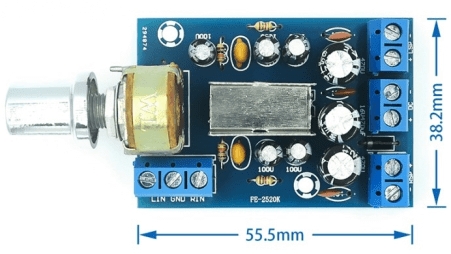
Description
What it is
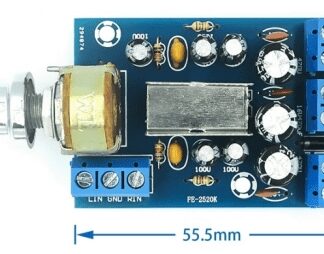
The Dual-Channel TEA2025B Stereo Audio Amplifier Board is an integrated circuit designed to amplify stereo audio signals. It offers a stereo output from two channels, ideal for powering speakers or headphones.
Features
- Type: Stereo Audio Amplifier Dual-Channel
- Model: TEA2025B
- SKU: ARD0011904
- Price: 3.28 €
What it is for
The TEA2025B Stereo Audio Amplifier Board is perfect for improving the sound quality of audio systems such as portable speakers, mini Hi-Fi PCs, or DIY systems. It can be used to create a stereo audio system for a PC by connecting the PC’s audio output to the board and the speakers to the board’s output. The board is optimized for connection to Arduino systems.
Tutorial: How to Use Stereo Audio Amplifier Board TEA2025B
The TEA2025B board is a stereo audio amplifier ideal for anyone looking to improve the audio of systems such as portable speakers or PCs. This component is particularly useful for makers who want to integrate a good audio system into DIY projects.
What you need
- Arduino Uno or compatible
- 3.5mm audio cable
- 5-12V power supply
- Headphones or speakers with audio input
- Audio connectors
Steps
- Connect the 5-12V power supply to the TEA2025B board
- Connect the Arduino to the control pin of the board
- Connect the audio input from the device to the audio input of the board
- Connect the speakers or headphones to the audio output of the board
- Check the volume and bass settings on the board’s datasheet
- Write the Arduino sketch to control the volume and other functions
- Test the complete audio system
- Resolve any audio issues
Example code
void setup() {
  pinMode(9, OUTPUT);
}

void loop() {
  analogWrite(9, 128); // Imposta il volume a metà
}
Mini project
Build a stereo audio system for PC with the TEA2025B. Connect the TEA2025B to the PC’s audio and to the speakers, control the volume with a button connected to the Arduino.
Common mistakes
- Insufficient power supply
- Incorrect audio connections
- Volume too high damaging the speakers
- Volume control not working
Recommended accessories
- Arduino Uno
- 3.5mm audio cable
- Breadboard
- Resistors
Frequently asked questions
How can I adjust the volume?
Use a potentiometer connected to the Arduino to adjust the volume.
Can I use the TEA2025B with batteries?
Yes, but verify that the supplied voltage is between 5-12V.
Reviews
There are no reviews yet.