 EN
 IT Italiano
 ES Español
 FR Français
 DE Deutsch
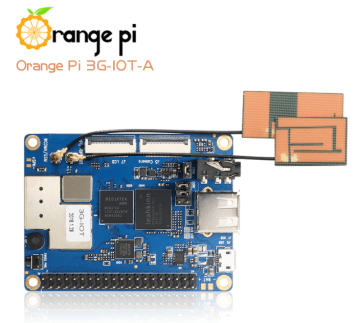
Description
What it is
Orange PI 3G-IOT-A MTK is a versatile microcomputer designed for IoT projects, software development, and Raspberry Pi-based applications.
Features
- 3G Connection
- Wi-Fi
- MTK Processor
What it is for
The Orange PI 3G-IOT-A MTK is ideal for creating prototypes and advanced solutions in the IoT field. It can be used to implement remote control systems, mobile applications, and other data-based solutions. Compatibility with Raspberry Pi software and libraries facilitates development and integration with other devices.
Tutorial: How to use Orange PI 3G-IOT-A MTK
The Orange PI 3G-IOT-A MTK is a versatile microcomputer ideal for IoT projects, software development, and Raspberry Pi-based applications. Useful for beginner and intermediate makers.
What you need
- Orange PI 3G-IOT-A MTK
- Power Supply (5V, 2A)
- MicroSD Card with Installation
- Monitor or Display
- HDMI Cable
Steps
- 1. Check the BIOS version on the datasheet.
- 2. Connect the power supply to the microcomputer.
- 3. Insert the MicroSD Card with the pre-installed OS.
- 4. Connect the HDMI cable to the monitor or display.
- 5. Turn on the power supply.
- 6. Start the operating system.
- 7. Configure the Wi-Fi and 3G connection.
- 8. Install the necessary software for your projects.
Mini project
Create a simple remote control lighting system using Wi-Fi. Configure the connection and control the lights via a mobile application.
Common mistakes
- Do not use a power supply lower than 5V and 2A.
- Check the datasheet to see if your MicroSD Card supports the BIOS version.
- Do not connect the microcomputer before having the operating system.
- Check the Wi-Fi and 3G configuration before starting the system.
Recommended accessories
- MicroSD Card
- Power Supply
- Monitor or Display
- HDMI cable
Frequently asked questions
Can I use a USB power supply to power the microcomputer?
No, USB power does not provide the necessary current. Use the specific power supply.
Which operating systems does the Orange PI 3G-IOT-A MTK support?
It supports Linux and other compatible operating systems.
How can I update the BIOS?
Check the datasheet for specific instructions.
Reviews
There are no reviews yet.