 EN
EN IT Italiano
 ES Español
 FR Français
 DE Deutsch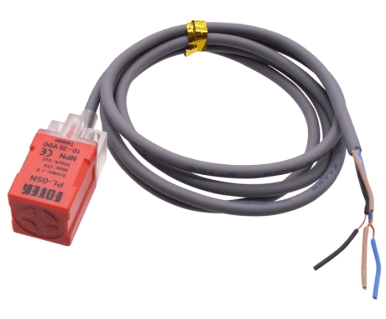
Description
What it is
The PL-05N / 2 NPN proximity switch is a magnetic field sensitive device used to detect the presence of metallic objects. It is a normally open switch, which means the circuit is open when no metallic object is detected and closes when a metallic object approaches.
Features
- Type: Proximity Switch
- Technology: NPN
- Mode: Normally Open
- Number of Wires: 3
- Material: Metal
- SKU: ARD0011941
- Price: 2.63 €
What it is for
The PL-05N / 2 NPN proximity switch is ideal for home or industrial automation projects where it is necessary to detect the presence of an object without physical contact. It can be used to create alarm systems, door/window sensors, access control systems, and many other applications.
Tutorial: How to use the PL-05N / 2 NPN Proximity Switch
The PL-05N / 2 NPN proximity switch is a magnetic field sensitive device used to detect metallic objects. It is ideal for home or industrial automation projects where the presence of an object needs to be detected without physical contact.
What you need
- Arduino Uno
- Connection Wire
- Head Connector
Steps
- Connect the proximity switch to the pins of your Arduino using a head connector.
- Check the polarity of the proximity switch wires (VCC, GND, OUT).
- Write an Arduino sketch to read the state of the proximity switch.
- Upload the sketch to your Arduino.
- Test the functionality of the proximity switch by bringing a metallic object close to it.
- Check the datasheet to set the power supply voltage correctly.
- If necessary, add a pull-up or pull-down resistor to ensure the correct state of the output when no metallic object is present.
- Modify the sketch to send a warning signal when the switch is activated.
Example code
const int interruptPin = 2;

void setup() {
  pinMode(interruptPin, INPUT);
  Serial.begin(9600);
}

void loop() {
  int interruptState = digitalRead(interruptPin);
  Serial.println(interruptState);
  delay(1000);
}
Mini project
Create a home alarm system that sends a message when a metallic object is brought near a door or window.
Common mistakes
- Do not check the polarity of the wires.
- Do not set the power supply voltage correctly.
- Do not add a pull-up or pull-down resistor.
- Do not test the switch function with a metallic object.
Recommended accessories
- Arduino Uno
- Connection cable
- Test head connector
- Various resistors
Frequently asked questions
How can I increase the sensitivity of the switch?
Check the datasheet to set the power supply voltage and detection distance correctly.
Does the switch work with non-metallic objects as well?
No, the PL-05N / 2 NPN proximity switch detects only metallic objects.
Can I connect multiple proximity switches together?
Yes, but make sure to connect the output pins correctly.

Reviews
There are no reviews yet.