 EN
EN IT Italiano
 ES Español
 FR Français
 DE Deutsch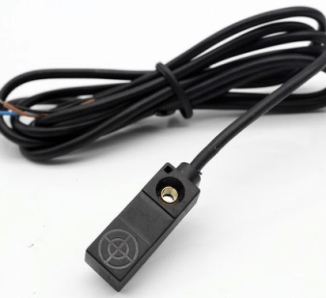
Description
What is the Miniature Hall Sensor ARD0011942? The miniature hall sensor is a magnetic switch designed to detect the presence of a magnetic field. This hall sensor is ideal for various electronic projects and can be used with Arduino and other microcontrollers. Features Power Supply: 6-36V Output Type: NPN Normally Open Reduced size for space-limited applications What does it do? This Hall Sensor can be used to create simple alarm systems that activate an LED when a magnetic object is brought near. It is compatible with Arduino and other microcontrollers supporting an NPN output. Tutorial: How to use Miniature Magnetic Switch The hall sensor is ideal for detecting the presence of a magnetic field and can be used in various electronic projects. What do you need? – Miniature Magnetic Switch ARD0011942 – Compatible Arduino or Microcontroller – 1kΩ Resistor – 2-pin Connector Steps: 1. Read specifications on the datasheet. 2. Connect the sensor to the microcontroller using a 2-pin connector. 3. Connect a 1kΩ resistor between the VCC pin of the sensor and the 5V of the microcontroller. 4. Connect the GND pin of the sensor to the GND of the microcontroller. 5. Write the following sketch to control the state of the sensor. 6. Upload the sketch to the microcontroller. 7. Apply a magnetic field near the sensor to check the output status. 8. Configure the output as input pull-up if necessary. Example Code “`cpp int hallPin = 2; int state = 0; void setup() { pinMode(hallPin, INPUT_PULLUP); } void loop() { state = digitalRead(hallPin); if (state == LOW) { Serial.println(“Magnetic field present”); } else { Serial.println(“Magnetic field absent”); } } “` Mini-project Create a simple security alarm that activates an LED when a magnetic object is brought near. Common mistakes Ensure correct pin connections for VCC and GND. Verify the sketch correctness and include the Serial library. Make sure the magnetic field is strong enough to activate the sensor. Check that the resistor is correctly connected. Recommended Accessories – LED – Resistor for LED – Arduino Uno – Magnetic Object Frequently Asked Questions How can I verify the state of the sensor? Apply a magnetic field near the sensor and check the output port status. What is the output voltage? Check on the datasheet. Can this sensor be used with microcontrollers other than Arduino? Yes, but verify compatibility.

Reviews
There are no reviews yet.