 EN
EN IT Italiano
 ES Español
 FR Français
 DE Deutsch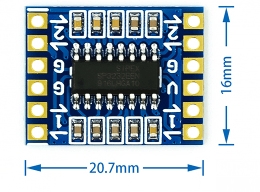
Description
What is the Dual Channel RS232 SP3232 Module? The Dual Channel RS232 SP3232 Module allows for conversion between TTL and RS232 signals, facilitating serial communication between devices with different logic levels. Features Conversion from TTL to RS232 and vice versa Compatible with Arduino and other TTL interface devices Dual channel module Use Cases This module is ideal for projects requiring serial communication between devices with different logic levels, such as connecting sensors to RS232 devices. It’s particularly useful for makers who want to send temperature or other data from a sensor to an RS232 system. Tutorial: How to use the RS232 SP3232 Module The RS232 SP3232 Module is essential for projects requiring serial communication between devices with different logic levels. This module is perfect for beginner and intermediate makers who want to connect TTL devices to RS232 and vice versa. What you need Arduino or microcontroller USB cable Physical connections Development software Steps Connect the RS232 SP3232 Module to the Arduino using the USB cable and physical connectors. Configure serial communication in the development software. Verify serial communication through the Arduino Serial Monitor. If necessary, modify the Arduino sketch to suit project requirements. Test RS232 communication with an external device. Check the stability of the connection and correct data transmission. Adjust signal logic level via the RS232 module if needed. Document results and configurations for future reference. Example code void setup() { Serial.begin(9600); } void loop() { Serial.println(“Test message”); delay(1000); } Mini-project Create a simple temperature monitoring system using a temperature sensor connected to the Arduino via the RS232 SP3232 Module. Send real-time temperature data to a computer or RS232 device. Common mistakes Setting incorrect serial communication speed. Connecting the RS232 module to the microcontroller with reversed polarity. Not verifying correct data transmission. Failing to update the Arduino sketch for project requirements.

Reviews
There are no reviews yet.