 EN
 IT Italiano
 ES Español
 FR Français
 DE Deutsch
Description
Technical Description
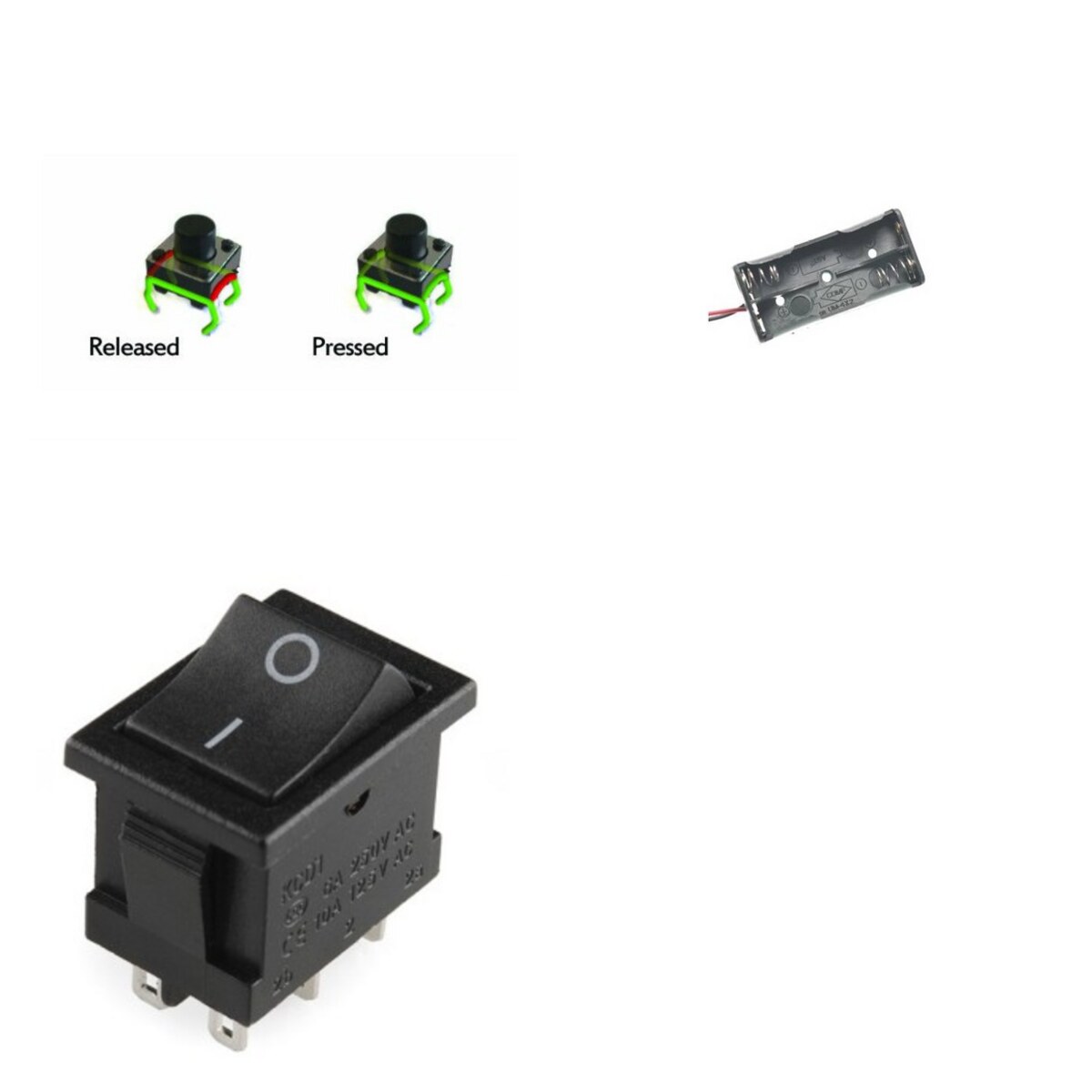
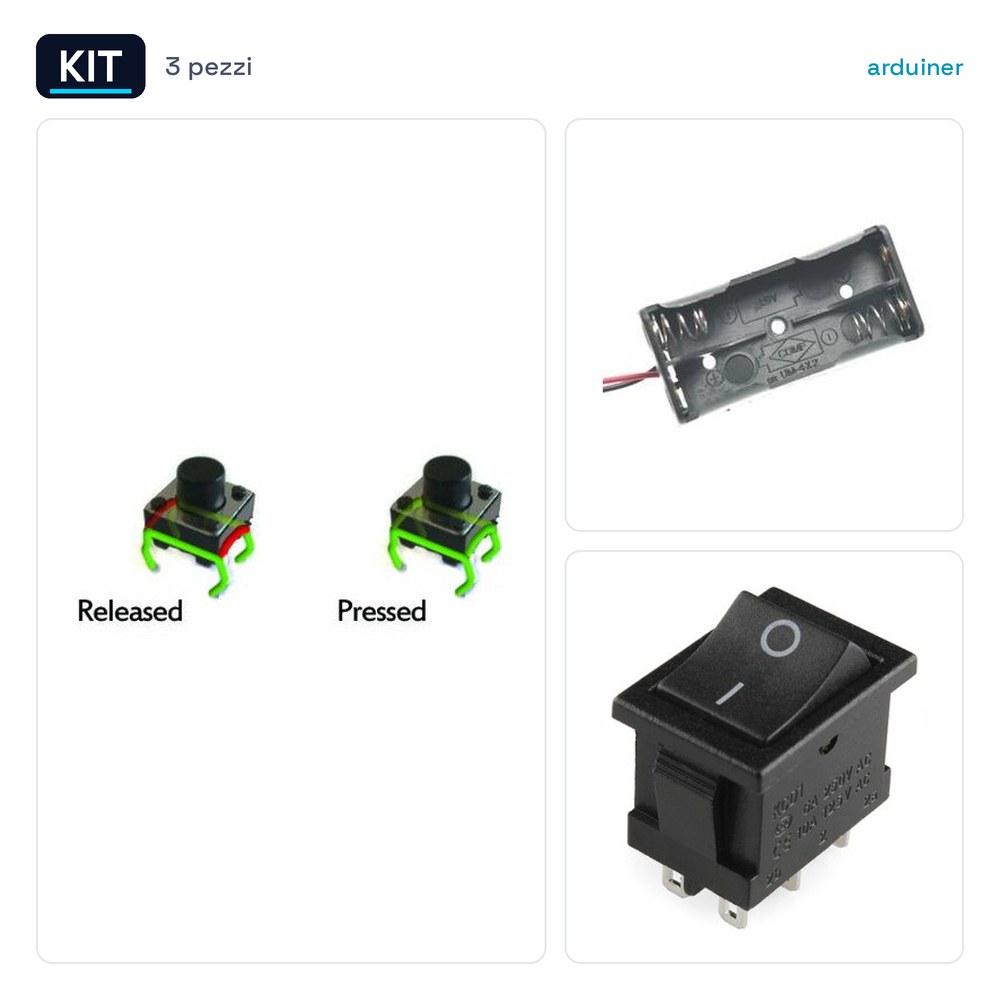
The 4 Piece Push Button 6 * 6 * 8 Switch sw + 2 slot AAA Battery Holder + T85 KCD1-B3 202 AC 6A 220V M is a set of electronic components used for the realization of electronic projects and prototypes. The kit includes four push button switches, two AA battery holders, and a small panel switch. These components are useful for creating electronic control circuits, managing electronic devices, and for the realization of user interfaces.
Push buttons are used to activate or deactivate electronic circuits. The AA battery holder is designed to house two AA batteries and provides an easy-to-manage power supply system. The T85 KCD1-B3 202 AC 6A 220V M panel switch is an electrical control device that can be used for the management of high-level circuits.
The kit is suitable for prototyping projects, electronic testing, and electrical control applications. It is important to verify the voltage and current specifications of each component before using it in a circuit.
Key Specifications
| Parameter | Value |
| Model | Kit 4 Pieces Push Button 6 * 6 * 8 Switch + 2 Slot AAA Battery Holder + T85 KCD1-B3 202 AC 6A 220V M |
| Quantity Switches | 4 |
| Switch Dimensions | 6 * 6 * 8 mm |
| Switch Type | Normally Open Switch |
| Quantity Battery Holders | 2 |
| Battery Holder Type | 2 AAA slots |
| Panel Switch Model | T85 KCD1-B3 202 AC 6A 220V |
| Panel Switch Interface | 6pin |
| Panel Switch Type | 0/1 DPDT |
| Panel Switch Voltage | 220V AC |
| Panel Switch Current | 6A |
| Container | Cardboard |
Installation and Usage
- Check that all components are present in the kit.
- Connect the push buttons to the electronic circuit according to the project specifications.
- Power the AA battery holder with two AA batteries.
- Connect the T85 KCD1-B3 202 AC 6A 220V panel switch M to the power circuit.
- Run a circuit test to verify proper operation.
Compatibility and Requirements
- The kit is compatible with various electronic boards such as Arduino and Raspberry Pi.
- An appropriate power circuit is required for the panel switch.
- An appropriate connector is needed to connect the push buttons to the circuit.
Limitations and Important Notes
- The panel switch is designed for low or medium voltage circuits.
- The push buttons are suitable for low voltage circuits.
- A protection circuit is necessary to manage the power supply correctly.
- Using inappropriate batteries can damage the container.
Troubleshooting
The push buttons do not work.
Probable cause: Incorrect connection or damaged switch.
Solution: Check connections and replace the switch if necessary.
The panel switch is stuck.
Probable cause: Presence of excessive current or lack of protection.
Solution: Check the circuit current and add appropriate protections.
The AA battery holder does not maintain charge.
Probable cause: Dead or defective batteries.
Solution: Replace batteries with new ones and check their compatibility.
The kit does not work properly.
Probable cause: Incorrect connection or failure to verify specifications.
Solution: Check connections and project specifications.
Use cases
Home security system
Objective: Activate and deactivate a security system.
What is needed: Kit 4 Pieces Push button 6 * 6 * 8 Switch sw + 2 slot AAA battery holder + T85 KCD1-B3 202 AC 6A 220V M
Steps: 1) Connect the push buttons to the security circuit. 2) Power the AA battery holder. 3) Connect the panel switch to the power circuit.
Expected result: The security system can be manually activated and deactivated.
Industrial electrical control project
Objective: Manage the control of electronic devices.
What is needed: Kit 4 Pieces Push Button 6 * 6 * 8 Switch + 2 Slot AAA Battery Holder + T85 KCD1-B3 202 AC 6A 220V M
Steps: 1) Connect the push buttons to the control circuit. 2) Power the AA battery holder. 3) Connect the panel switch to the power circuit.
Expected result: The electronic device can be manually controlled.
Prototype project
Objective: Test and verify a prototype.
What is needed: Kit of 4 Push Button Switch 6 * 6 * 8 + 2 Slot AAA Battery Holder + T85 KCD1-B3 202 AC 6A 220V M
Steps: 1) Connect the push buttons to the test circuit. 2) Power the AA battery holder. 3) Connect the panel switch to the power circuit.
Expected result: The prototype can be tested and verified.
Home Control System
Objective: To manage the control of home devices.
What is needed: Kit of 4 Push Button Switch 6 * 6 * 8 + 2 Slot AAA Battery Holder + T85 KCD1-B3 202 AC 6A 220V M
Steps: 1) Connect the push buttons to the control circuit. 2) Power the AA battery holder. 3) Connect the panel switch to the power circuit.
Expected result: Home devices can be manually controlled.
Electronic Test Project
Objective: Test and verify an electronic circuit.
What is needed: Kit 4 Pieces Push Button 6 * 6 * 8 Switch sw + 2 slot AAA battery holder + T85 KCD1-B3 202 AC 6A 220V M
Steps: 1) Connect the push buttons to the test circuit. 2) Power the AA battery holder. 3) Connect the panel switch to the power circuit.
Expected result: The electronic circuit can be tested and verified.
Home Automation Project
Objective: Manage the automation of home devices.
What is needed: Kit 4 Pieces Push Button 6 * 6 * 8 Switch sw + 2 slot AAA battery holder + T85 KCD1-B3 202 AC 6A 220V M
Steps: 1) Connect the push buttons to the automation circuit. 2) Power the AA battery holder. 3) Connect the panel switch to the power circuit.
Expected Result: Domestic devices can be manually automated.
Industrial Control Project
Objective: Manage the control of industrial devices.
What’s needed: Kit 4 Pieces Push Button 6 * 6 * 8 Switch sw + 2 slot AAA battery holder + T85 KCD1-B3 202 AC 6A 220V M
Steps: 1) Connect the push buttons to the control circuit. 2) Power the AA battery holder. 3) Connect the panel switch to the power circuit.
Expected Result: Industrial devices can be manually controlled.
Industrial Security System
Objective: Activate and deactivate an industrial security system.
What’s needed: Kit 4 Pieces Push Button 6 * 6 * 8 Switch sw + 2 slot AAA battery holder + T85 KCD1-B3 202 AC 6A 220V M
Steps: 1) Connect the push buttons to the security circuit. 2) Power the AA battery holder. 3) Connect the panel switch to the power circuit.
Expected result: The industrial security system can be manually activated and deactivated.
In the package
- 4 Pieces Push Button 6 * 6 * 8 Switch
- 2 slot AAA battery holder
- 1 T85 KCD1-B3 202 AC 6A 220V M
Complete the project
- T85 KCD1-B3 202 AC 6A 220V Mini Panel Switch 6pin 0/1 DPDT: The T85 KCD1-B3 202 AC 6A 220V M is a panel switch compatible with the kit and can be used to control high-level circuits.
- 3 slot AAA battery holder: The AA battery holders can be used to power the kit and other electronic devices.
- 1 slot AAA battery holder
Technical FAQs
How to connect the push buttons to the circuit?
Connect the terminals of the push buttons to the electronic circuit according to the project specifications.
Why is the panel switch locked?
Check the circuit current and add appropriate protections.
Which batteries are compatible with the container?
Use AA compatible batteries with the container.
What are the usage limits of the kit?
The panel switch is designed for low or medium voltage circuits, the push buttons are suitable for low voltage circuits, a protection circuit is necessary to properly manage the power supply.

Reviews
There are no reviews yet.