 EN
 IT Italiano
 ES Español
 FR Français
 DE Deutsch
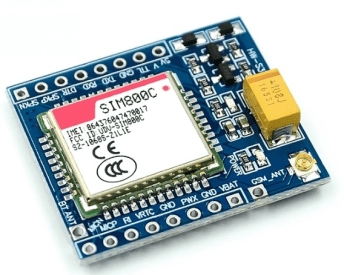
Description
What it is
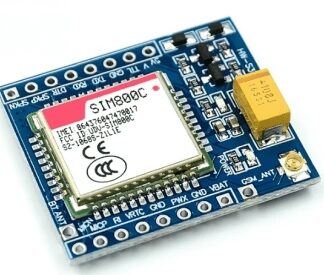
The GSM GPRS SIM800C 5V module is an electronic component that allows microcontroller-based devices to connect to GSM and GPRS cellular networks. It integrates the SIM800C module, a GSM/GPRS chip, and a programmable STM32 C51 microcontroller. It also includes Bluetooth and TTS (Text-to-Speech) features.
Features
- 5V and 3.3V voltage compatibility
- TTL interface
- Integrated GSM/GPRS SIM800C module
- Programmable STM32 C51 microcontroller
- Bluetooth functionality
- TTS (Text-to-Speech) functionality
What it is for
This module is ideal for IoT (Internet of Things) projects that require cellular connectivity. It can be used to create devices that send SMS, make calls, or access the internet via a cellular network. Examples of use include alarm devices that send SMS upon activation, sensors that transmit real-time data, or remote control systems.
Tutorial: How to Use the GSM GPRS SIM800C Module with Bluetooth and TTS
The GSM GPRS SIM800C module is an essential component for anyone who wants to create projects that require cellular connectivity. It is ideal for makers who want to create devices that send SMS, make calls, or access the internet through a cellular network.
What you need
- GSM GPRS SIM800C Module
- SIM Card
- Arduino or compatible microcontroller
- USB cable for Arduino
- Connections for power and data (5V/3.3V)
- Programming software (Arduino IDE)
Steps
- Connect the GSM GPRS SIM800C module to the Arduino using TTL cables for data communication.
- Insert the SIM card into the GSM module.
- Power the GSM module with 5V or 3.3V.
- Install the GSM/GPRS library for Arduino.
- Write a simple sketch to test connectivity.
- Verify connectivity by sending an SMS or making a call.
- Configure the module to use Bluetooth.
- Verify the TTS (Text To Speech) function to transform text into speech.
Example code
/*
  Esempio di codice per inviare un SMS
*/
#include <SoftwareSerial.h>
SoftwareSerial gprsSerial(10, 11); // RX, TX

void setup() {
  Serial.begin(9600);
  gprsSerial.begin(9600);
}

void loop() {
  gprsSerial.println("AT+CMGF=1"); // Set SMS mode to text
  gprsSerial.println("AT+CMGS=""+391234567890""); // Send SMS to this number
  gprsSerial.println("Test message", true); // Message and Ctrl+Z
  delay(5000);
}
Mini project
Create an alarm device that sends an SMS when activated. Connect a motion sensor to the GSM module and write a sketch that sends a message when the sensor is triggered.
Common mistakes
- Make sure you have the correct power supply voltage (5V or 3.3V).
- Check that the library is installed correctly.
- Ensure that the SIM card is inserted correctly and has a subscription.
- Verify the module configuration for Bluetooth and TTS.
Recommended accessories
- GSM antenna to improve reception
- Portable battery for power supply
- Relay to control external devices
- PIR motion sensor
Frequently asked questions
How can I control the GSM module remotely?
Use a cloud computing platform like Blynk or ThingSpeak to control the GSM module remotely.
What AT commands can I use with the GSM module?
Consult the module datasheet for a complete list of supported AT commands.
The module is not responding, what should I do?
Check the data connection and power supply to the module.
Reviews
There are no reviews yet.