 EN
EN IT Italiano
 ES Español
 FR Français
 DE Deutsch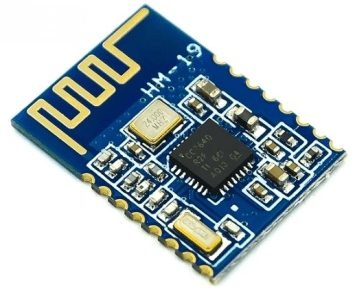
Description
What it is
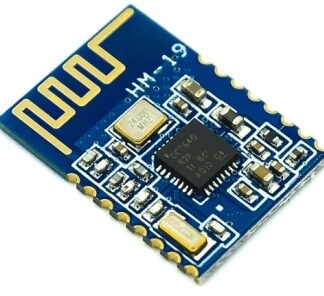
The CC2640R2F / ble4.0 4.2 5.0 Bluetooth module is a device that allows your electronic projects to connect to mobile devices or computers via Bluetooth.
Features
- CC2640R2F Bluetooth Chip
- Compatible with Bluetooth 4.0, 4.2, and 5.0
- Wireless serial connection
- Model HM-19
- High data transmission speed
What it is for
This module is ideal for creating IoT applications and Arduino projects. You can use it to control electronic devices with your smartphone, send data between microcontrollers and mobile devices, or create remote monitoring systems. Compatibility with Bluetooth 4.0, 4.2, and 5.0 allows the module to connect to a wide range of modern devices.
Tutorial: How to Use the CC2640R2F Bluetooth Module
This CC2640R2F Bluetooth module is ideal for connecting your Arduino projects to mobile devices or computers wirelessly. Useful for beginner and intermediate makers.
What you need
- Arduino or compatible
- USB cable
- Bluetooth antenna
- Arduino IDE software
Steps
- 1. Install the Bluetooth module on your Arduino using a support.
- 2. Connect the Bluetooth antenna to the module.
- 3. Download and install the Bluetooth driver on your computer.
- 4. Open the Arduino IDE software.
- 5. Insert the following code to initialize the module:
- 6. `#include
` - 7. `SoftwareSerial bluetooth(10, 11);`
- 8. `bluetooth.begin(9600);`
- 9. Upload the code to Arduino.
- 10. Try to send a message from your smartphone using a Bluetooth app.
Example code
```cpp
#include <SoftwareSerial.h>
SoftwareSerial bluetooth(10, 11);
bluetooth.begin(9600);
void loop() {
  if (bluetooth.available()) {
    Serial.write(bluetooth.read());
  }
}
```
Mini project
Create a simple remote control command to control an LED with your smartphone.
Common mistakes
- Do not initialize the Bluetooth module correctly.
- Forget to connect the Bluetooth antenna.
- Use a baud rate different from 9600.
- Do not have the Bluetooth driver installed on the computer.
Recommended accessories
- Bluetooth Antenna
- Short USB cable
- Arduino Uno or compatible
- Arduino IDE software
Frequently asked questions
How can I check if the Bluetooth module is functioning?
Check the connection with a Bluetooth app and send a test message.
What is the default baud rate for the module?
The default baud rate is 9600.
Can I use this module with other microcontrollers?
Yes, it is compatible with various microcontrollers that support SoftwareSerial.
What are the minimum power requirements for the module?
Check the datasheet for minimum power requirements.
Reviews
There are no reviews yet.