 EN
 IT Italiano
 ES Español
 FR Français
 DE Deutsch
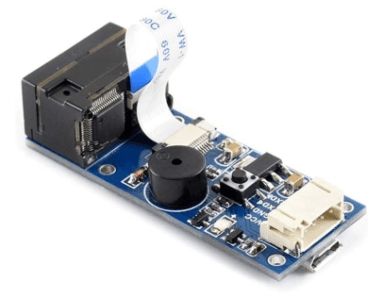
Description
What it is
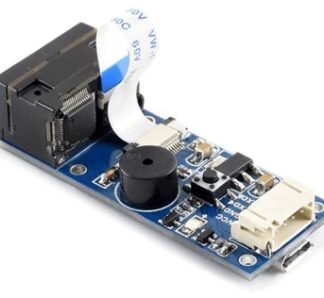
The Barcode and QR Code Scanner Module with PDF417 Support is a device that allows for quick and precise scanning of barcodes and QR codes, including PDF417 and Data Matrix codes. This module is designed for use in electronic and robotics projects, offering a simple and reliable solution for managing encoded data.
Features
- Quick and precise scanning of barcodes and QR codes
- Support for PDF417 and Data Matrix codes
- Compatible with Arduino
What it is for
This module is ideal for inventory, warehouse, and access control projects. You can use it to create a QR code-based access control system in just a few minutes. It is compatible with Arduino and can be easily integrated into various electronic devices.
Tutorial: How to use Barcode and QR Code Scanner
This module allows you to scan barcodes and QR Codes directly on your Arduino. Ideal for inventory, warehouse, and access control projects.
What you need
- Arduino
- USB cable
- PC with Arduino IDE
Steps
- 1. Connect the module to your Arduino using the USB cables.
- 2. Install the Barcode library in Arduino IDE.
- 3. Load the provided example code.
- 4. Connect the module to a power source.
- 5. Download the provided minimum code.
- 6. Check the datasheet for power specifications.
- 7. Test scanning a barcode.
- 8. Test scanning a QR Code.
Example code
```void loop() { if (barcode.available()) { String barcodeValue = barcode.read(); Serial.println(barcodeValue); }}```Mini project
Create an access control system based on QR codes in 30 minutes.
Common mistakes
- Do not connect the module directly to the micro USB of the Arduino.
- Verify the proper power supply for the module.
- Ensure the Barcode library is installed correctly.
Recommended accessories
- Arduino Uno
- USB A-B cable
- Arduino Support
Frequently asked questions
How can I test the scan?
Use a barcode or QR Code and connect it to the module.
What is the required supply voltage?
Check the supply specifications on the datasheet.
Can I use this module with Arduino Nano?
Yes, but check the supply current.
Reviews
There are no reviews yet.