 EN
 IT Italiano
 ES Español
 FR Français
 DE Deutsch
Description
What it is
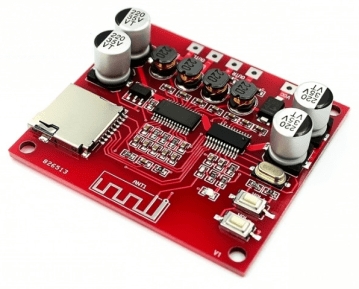
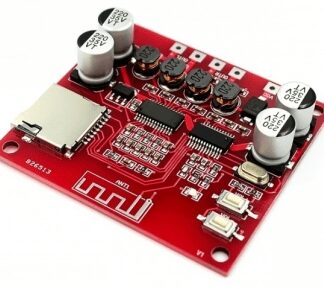
XH-A233 is a Bluetooth power amplifier board with version 4.2, designed to power desktop speakers. It allows wireless connection of audio devices to a speaker, offering clear and powerful sound.
Features
- Bluetooth Version: 4.2
- Power Supply: 12-24V
- Power Output: Dual 30W
- SKU: ARD0011967
- Price: 6.66 €
What it is for
The XH-A233 is ideal for creating portable audio systems, connecting desktop speakers to mobile devices wirelessly, or integrating an audio system into DIY projects. Compatibility with Arduino and ESP can be verified in the datasheet.
Tutorial: How to Use XH-A233
This Bluetooth amplifier allows for easy wireless connection of a desktop speaker to a mobile device, ideal for audio projects and home setups.
What you need
- XH-A233
- Speaker
- Bluetooth Device (smartphone or tablet)
- Audio Track or Music
Steps
- 1. Ensure the speaker is powered with 12-24 V.
- 2. Turn on the speaker.
- 3. Prepare your Bluetooth device.
- 4. Press and hold the connection button for 3 seconds.
- 5. The connection signal will light up.
- 6. In the device list, look for ‘XH-A233’.
- 7. Select the device and accept the connection.
- 8. Try playing an audio file to check the connection.
Mini project
Create a portable audio system for your drawing studio. Connect the Bluetooth speaker XH-A233 to a laptop and listen to music while you draw.
Common mistakes
- Not pressing the connection button long enough.
- Not checking if the connection signal has lit up.
- Connecting the speaker to an incompatible voltage.
- Not having an audio file available to test the connection.
Recommended accessories
- Speaker
- 12-24 V power cable
- Bluetooth device (smartphone or tablet)
- Audio track or music
Frequently asked questions
Why can’t I connect?
Check if the connection signal has turned on and if the Bluetooth device is in the list of devices.
The speaker is not producing any sound.
Make sure the speaker is properly powered and that the volume is set to an appropriate level.
The connection signal does not turn on.
Press the connection button for 3 seconds and check if the signal turns on.
The volume is too low.
Check the volume settings for both the speaker and the Bluetooth device.
Reviews
There are no reviews yet.