 EN
 IT Italiano
 ES Español
 FR Français
 DE Deutsch
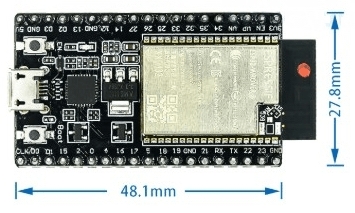
Description
What it is
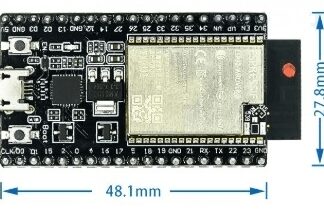
The WROVER module is an electronic component that can be used as external memory for Arduino microcontrollers.
Features
- SKU: ARD0011764
- Price: 15.1 €
What it is for
The WROVER module is ideal for IoT projects that require a large amount of memory. It can be used to create applications such as a simple shot counter using a button and an LED. Compatibility with specific Arduino microcontrollers should be verified in the datasheet.
Tutorial: How to use the WROVER module
The WROVER module is ideal for projects that require a large amount of memory. Useful for beginner and intermediate makers.
What you need
- Arduino IDE
- USB cable
- 10kΩ resistor
- LiPo battery 3.7V (optional)
Steps
- 1. Download and install the Arduino IDE.
- 2. Connect the WROVER module to the Arduino using the ground and VCC pins.
- 3. Add the STM32 driver to your Arduino IDE.
- 4. Verify the correct pin configuration in the datasheet.
- 5. Load the example code provided onto the module.
- 6. Verify the connection with a serial monitor.
- 7. (Optional) Connect a 3.7V LiPo battery to power the module.
- 8. Try to run a simple test sketch.
Example code
```
Serial.begin(9600);
while (true) {
  Serial.println("Hello, WROVER!");
  delay(1000);
}
```
Mini project
Create a simple button hit counter using a button and an LED.
Common mistakes
- Forget to add the STM32 driver.
- Incorrectly connect the pins.
- Use an incompatible power supply.
- Omit configuring the baud rate in the serial monitor.
Recommended accessories
- Push button
- LED
- LED resistor
- 3.7V LiPo battery
Frequently asked questions
How can I verify the correct pin configuration?
Check the module WROVER datasheet.
Can I use the WROVER module with Arduino Uno?
Yes, but make sure to configure the pins correctly.
What example sketches are provided with the module?
Check the manufacturer’s website for further details.
Reviews
There are no reviews yet.