 EN
EN IT Italiano
 ES Español
 FR Français
 DE Deutsch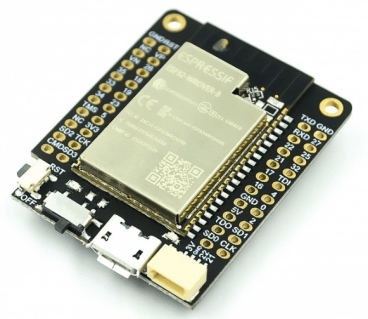
Description
What is the TTGO Mini32 Expansion Board? The TTGO Mini32 Expansion Board is an ESP32-WROVER-B PSRAM module with integrated Wi-Fi and Bluetooth. Equipped with PSRAM memory, it is ideal for IoT projects and advanced software development. Features Microcontroller: ESP32-WROVER-B Integrated Wi-Fi Integrated Bluetooth PSRAM Memory What does the TTGO Mini32 do? The TTGO Mini32 is suitable for IoT projects such as remote control devices, connected sensors, and wireless communication applications. It can be programmed with the Arduino IDE and offers a wide range of libraries and resources for developers. Tutorial: How to use TTGO Mini32 The TTGO Mini32 is an ESP32-WROVER-B PSRAM Wi-Fi Bluetooth module ideal for IoT projects and advanced programming. Useful for beginner and intermediate makers. What do you need? TTGO Mini32 Arduino IDE USB cable Micro SD card (optional) Steps 1. Download and install the Arduino IDE. 2. Connect the TTGO Mini32 to your PC via USB. 3. Configure your board as ESP32-WROVER-B in the IDE. 4. Load the ‘Blink’ example code to test the module. 5. Connect an OLED display (I2C) to display information. 6. Add a temperature sensor (DHT22) to measure environmental data. 7. Configure Wi-Fi and connect the module to the Internet. 8. Test a simple sketch to control a DC motor. Example Code “`cpp #include const char* ssid = “YOUR_SSID”; const char* password = “YOUR_PWD”; void setup() { Serial.begin(115200); WiFi.begin(ssid, password); while (WiFi.status() != WL_CONNECTED) { delay(1000); Serial.println(“Connecting…”); } Serial.println(“Connected!”); } void loop() {}“` Mini-project Create a remote control device for an LED using the Wi-Fi module. Common mistakes Forgetting to configure Wi-Fi correctly. Improperly connecting module pins. Using non-optimised Arduino code. Failing to update necessary libraries. Recommended Accessories OLED Display (I2C) DHT22 Temperature Sensor DC Motor I2C Cable Frequently Asked Questions How do I connect an OLED display? Connect D0 to the OLED display and D1 for reset. Use the Adafruit_SSD1306 library. What libraries should I install to use the module? Install the Adafruit GFX, Adafruit SSD1306, and WiFi libraries. How can I control a DC motor? Install the Adafruit Motor Shield library and follow the example code. Does the module support Bluetooth? Yes, use Bluetooth libraries to connect Bluetooth devices.

Reviews
There are no reviews yet.