 EN
 IT Italiano
 ES Español
 FR Français
 DE Deutsch

Description
What it is
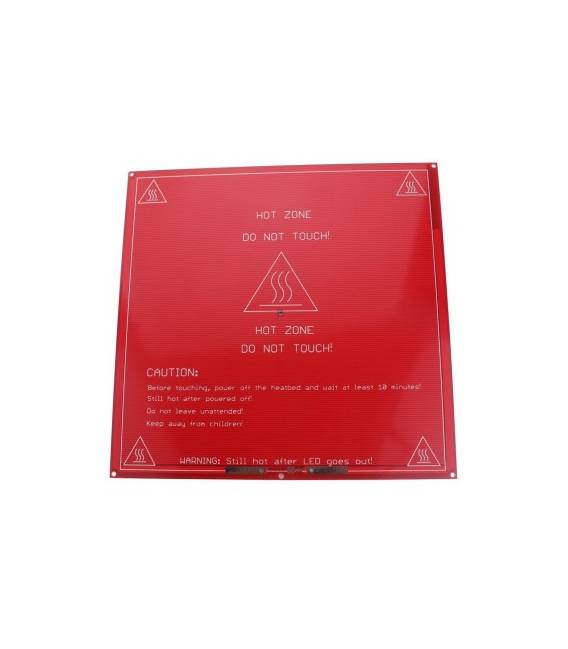
The heated bed Reprap MK2 is a crucial component for Prusa Mendel 3D printers. It improves print quality by maintaining a constant bed temperature during the printing process, reducing adhesion issues and preventing warping in printed parts.
Features
- Heated bed Reprap MK2 for Prusa Mendel 3D printers
- Optimizes print conditions
- Reduces adhesion issues of the printed part on the bed
What it is for
The heated bed Reprap MK2 is ideal for makers who desire more precise control during printing, reducing the risk of warping in printed parts. It is compatible with Prusa Mendel 3D printers and can be used with materials such as ABS or PLA.
Tutorial: How to use the Heated Bed Reprap MK2
The heated bed Reprap MK2 is essential for Prusa Mendel 3D printers, improving print quality by maintaining a constant bed temperature during the printing operation. This component is ideal for makers who desire more precise control and reduce the risk of warping in printed parts.
What you need
- Prusa Mendel 3D Printer
- Connection to the printer controller
- Power cable
Steps
- Check the compatibility of the heated bed with your specific Prusa Mendel printer model.
- Install the heated bed on the printer table, ensuring it is securely fastened and centered.
- Connect power to the heated bed following the instructions in the datasheet.
- Configure the operating temperature of the heated bed in the printer control software (G-code or slicer).
- Test the system to ensure that the heated bed warms up correctly and maintains a constant temperature during operation.
- Check the quality of the printed parts, noting improvements in adhesion results and reduction of deformation-related issues.
Mini project
Create a small airsoft projectile in ABS or PLA. Note the difference in print quality with the heated bed active compared to its non-use.
Common mistakes
- Disconnection of the power cable during the printing operation.
- Incorrect temperature configuration in the control software.
- Poorly installed heated bed, causing unwanted shakes or movements during printing.
Recommended accessories
- Power cable for heated bed
- Thermometer to check the bed temperature
- 3D printer maintenance kit
Frequently asked questions
My heated bed does not turn on.
Check all electrical connections, ensure that the power supply lead is properly plugged in.
What should I do if the bed temperature is too low?
Increase the configured temperature gradually in the software up to the value indicated by the datasheet.

Reviews
There are no reviews yet.