 EN
 IT Italiano
 ES Español
 FR Français
 DE Deutsch
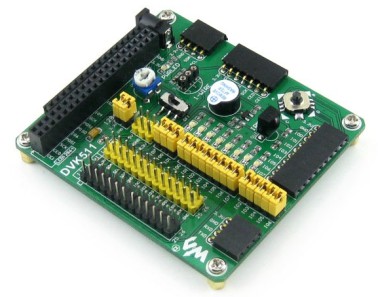
Description
What it is
The Raspberry Pi DVK511 expansion board is a device that allows you to add functionality to your Raspberry Pi, providing I2C, SPI, 8 IO, UART, and LCD interfaces. This board is designed to facilitate the connection of various sensors and external devices, making it easier to create advanced projects.
Features
- I2C Interface
- SPI Interface
- 8 Input/Output (IO)
- UART Interface
- LCD Interface
- Compatible with Raspberry Pi
What it is for
The DVK511 board is ideal for projects that require sensor and external device connectivity through I2C, SPI, and UART protocols. It can be used for data display on an LCD screen and for managing various digital inputs and outputs. Suitable for developers and hobbyists working on environmental monitoring, industrial controls, and more.
Tutorial: How to Use the Raspberry Pi Expansion/Evaluation Board DVK511
The Raspberry Pi Expansion/Evaluation Board DVK511 is a multi-platform interface that allows you to expand the functionality of your Raspberry Pi. It is ideal for projects requiring the use of I2C, SPI, 8 IO, UART, and LCD.
What you need
- Raspberry Pi
- MicroSD card with Raspbian
- USB power cable
- HDMI cable
- Monitor or TV
- I2C/SPI/LCD connections
Steps
- Connect the Raspberry Pi to power and the monitor using the HDMI and USB cables.
- Install Raspbian or another Linux distribution on a MicroSD card.
- Connect the Raspberry Pi to the DVK511 using the appropriate connectors for I2C, SPI, 8IO, UART, and LCD.
- Configure the operating system to recognize the expansion (refer to the datasheet for specific details).
- Try writing a simple Python script to test the I2C and SPI features.
- Check UART connectivity and test communication with another device (refer to the datasheet for specific details).
- Install a test software for LCD and try to display a welcome message.
- Test the 8IO features to control external devices such as LEDs or sensors (refer to the datasheet for specific details).
Example code
import smbus
i2c = smbus.SMBus(1)
# Verifica sul datasheet per l'indirizzo I2C specifico del dispositivo
Mini project
Create a small environmental monitoring system that reads data from a temperature and humidity sensor and displays it on an LCD display connected to the Raspberry Pi Expansion/Evaluation Board DVK511.
Common mistakes
- Do not check the system configuration before connecting the expansion.
- Do not carefully read the datasheet for I2C, SPI, and LCD specifications.
- Do not correctly test UART connectivity.
- Do not check the proper power supply of the expanded circuit.
Recommended accessories
- Raspberry Pi Starter Kit
- Temperature and Humidity Sensors
- 16×2 LCD Display
- Prototype kit and jumper wire
Frequently asked questions
Is this board compatible with all versions of Raspberry Pi?
Check the datasheet for specific compatibility.
Which programming languages does it support?
It primarily supports Python and Bash for configuration and testing.
Can I use this board with Arduino?
It is not designed to be used directly with Arduino, but it could be used with a Raspberry Pi that communicates with Arduino via UART or I2C.
Reviews
There are no reviews yet.