 EN
 IT Italiano
 ES Español
 FR Français
 DE Deutsch
Description
What it is
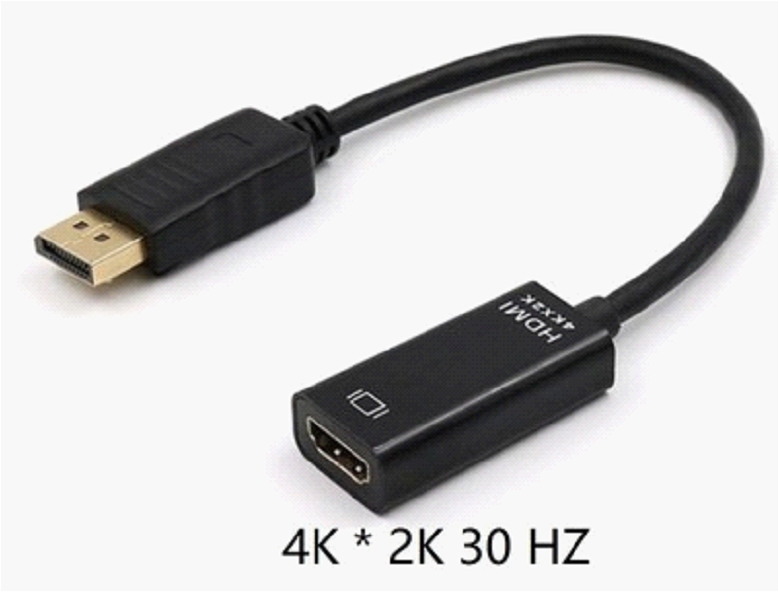
The DP Female to HD 4K 30HZ 25CM Adapter is a device that allows connecting devices with DisplayPort outputs to HDMI screens or projectors. This adapter is useful for those who need to transmit video and audio from a device using DisplayPort connectors to one that requires an HDMI connector.
Features
- DP Female to HD 4K 30HZ Adapter
- Cable length: 25 cm
- Compatible with resolutions up to 4K
- Maximum refresh rate: 30 Hz
What it is for
This adapter is ideal for anyone who needs to connect a computer or console with DisplayPort connectors to an HDMI monitor. It can be used for presentations, videos, or any other project that requires transmitting video and audio from a DisplayPort device to HDMI.
Tutorial: How to use DP Female to HD 4K 30HZ 25CM Adapter
This HDMI adapter is ideal for anyone who needs to connect DisplayPort devices to HDMI screens. It is particularly useful for those who have a computer or console that uses DisplayPort and want to use an HDMI monitor.
What you need
- Device with DisplayPort output
- Screen or TV with HDMI input
- Female DP to HD 4K 30HZ 25CM Adapter
Steps
- Check that your device has a DisplayPort output.
- Check that your screen or TV has an HDMI input.
- Connect the DisplayPort end of the adapter to your device.
- Connect the HDMI end of the adapter to your screen or TV.
- Make sure that both the device and the monitor are turned on.
- Adjust any input settings on the monitor to select the HDMI source.
- Check that the audio and video are correctly synchronized.
- If necessary, install any additional drivers for the DisplayPort device.
Mini project
Connect your computer with DisplayPort to an HDMI projector for presentations or videos.
Common mistakes
- The connection does not work because the monitor is not set to HDMI as the main input.
- The monitor does not recognize the video format of the device.
- The DisplayPort device does not support the 4K resolution.
- The cable is damaged or does not work properly.
Recommended accessories
- 3m HDMI cable
- HDMI to DVI adapter
- DisplayPort extension
- Mini DisplayPort to DisplayPort adapter
Frequently asked questions
My monitor does not recognize the DisplayPort connection.
Check that the monitor is set to the correct HDMI input and that the DisplayPort device supports the monitor’s resolution.
Do I need an adapter for audio?
Check the datasheet if the adapter supports audio. Otherwise, a separate audio adapter may be necessary.
Reviews
There are no reviews yet.