 EN
 IT Italiano
 ES Español
 FR Français
 DE Deutsch
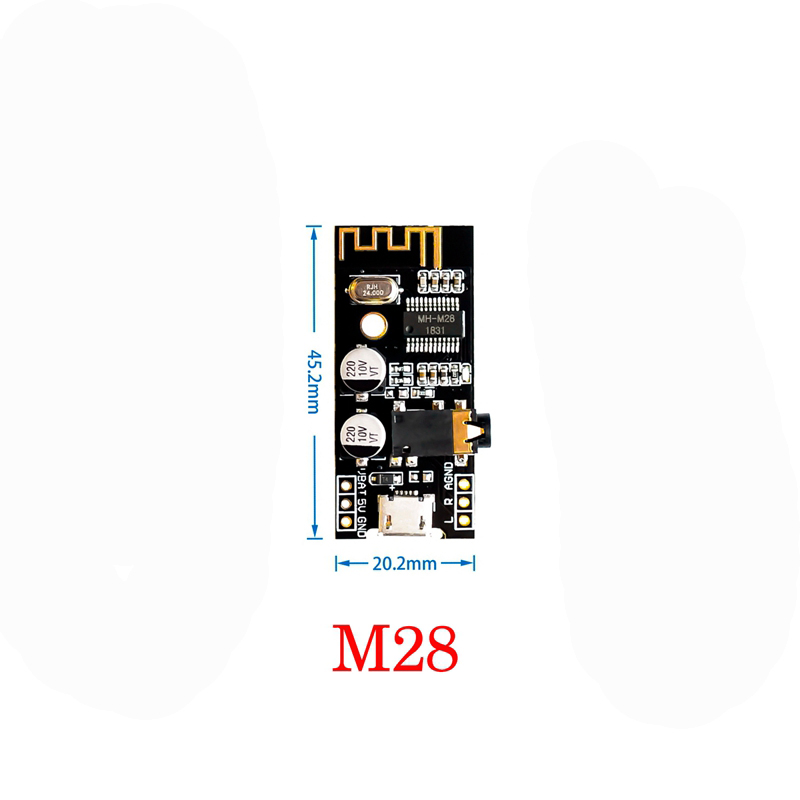
Description
What it is
The MH-M28 Bluetooth audio receiver module is a device that allows integrating Bluetooth functionality into various electronic projects. It decodes MP3 and BLT 4.2 lossless formats, enabling wireless audio connections between audio devices and Bluetooth systems.
Features
- Decodes MP3 and BLT 4.2 lossless
- Compatible with Arduino prototypes and other systems
- Facilitates audio integration into various devices
What it is for
The MH-M28 Bluetooth audio receiver module is ideal for projects requiring wireless audio transmission. It can be used to create portable Bluetooth speaker systems, integrate audio features into 3D printing or drone projects, and for any other project that requires a Bluetooth audio connection. Check the datasheet for further details on compatibility and technical specifications.
Tutorial: How to use MH-M28 Bluetooth Audio Receiver Module
The MH-M28 Bluetooth audio receiver module is a practical device for connecting audio devices to any Bluetooth system. Ideal for beginners and makers who want to add Bluetooth functionality to their projects.
What you need
- Arduino Uno or compatible
- Audio connections
- Arduino software
Steps
- Connect the Bluetooth module to the VCC and GND pins of the Arduino.
- Connect the TX and RX pins of the Bluetooth module to pins 0 and 1 of the Arduino.
- Install the Bluetooth HC-05 or similar library in Arduino.
- Configure the Bluetooth module with a name and address.
- Write an Arduino sketch to manage the Bluetooth connection.
- Test the connection between the Bluetooth module and a Bluetooth audio device.
- Verify audio reception from the Bluetooth module.
- Configure the module for lossless BLT 4.2 decoding (check the datasheet).
Example code
void setup() {
Serial.begin(9600);
}

void loop() {
// Aggiungi qui il codice per gestire la connessione Bluetooth
}
Mini project
Create a portable Bluetooth speaker system with the Bluetooth audio receiver module MH-M28 and a small amplifier.
Common mistakes
- Do not verify the correct configuration of the Bluetooth module.
- Do not connect the TX and RX pins correctly.
- Do not install the necessary library for Arduino.
- Do not test the audio connection before using the module in a complete project.
Recommended accessories
- Bluetooth compatible speakers
- Audio amplifier
- 3.5 mm audio cable
- External Bluetooth antenna
Frequently asked questions
How can I configure the module name?
Use an Arduino sketch to send configuration commands to the Bluetooth module.
What is the maximum range of the module?
Check the module datasheet for the maximum range.
Can the module decode lossless audio files?
Yes, check the settings on the datasheet to enable lossless BLT 4.2 decoding.
Reviews
There are no reviews yet.