 EN
 IT Italiano
 ES Español
 FR Français
 DE Deutsch

Description
What it is
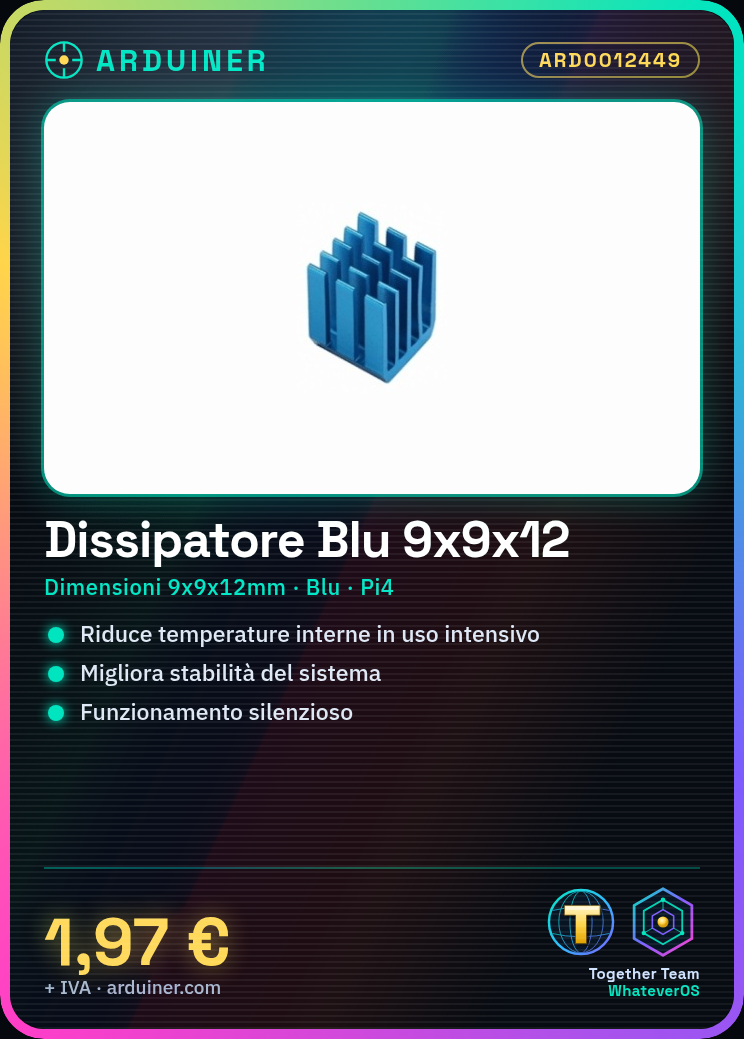
The Blue 9x9x12mm Heat Sink for Raspberry Pi 4 is an essential component to improve the cooling of your Raspberry Pi 4, ensuring stable and quiet operation.
Features
- Dimensions: 9x9x12mm
- Color: Blue
- Compatible with Raspberry Pi 4
What it is for
This heat sink helps reduce the internal temperatures of the Raspberry Pi 4 during intensive use, preventing thermal overload and improving system stability. It is particularly useful for projects that require high computational load or for warm environments.
Tutorial: How to Use Blue 9x9x12mm Heat Sink for Raspberry Pi 4
The Blue 9x9x12mm heat sink is designed to improve the cooling of your Raspberry Pi 4, ensuring stable and quiet operation. This tutorial is ideal for beginners who want to protect their Raspberry Pi from thermal overload.
What you need
- Raspberry Pi 4
- Thermal silicone
- 1x Philips Screwdriver
- Blue Heat Sink 9x9x12mm
- Fan (optional)
- Spray Paint (optional)
Steps
- Gently open the Raspberry Pi 4 and position the Blue Heat Sink over the CPU.
- Apply a thin strip of thermal silicone on the CPU.
- Wrap the Blue Heat Sink around the CPU, ensuring uniform contact.
- If necessary, attach a small fan to the end of the heat sink to improve cooling.
- If you want to customize the heat sink, apply spray paint of your preferred color after attaching the fan (optional).
- Gently close the Raspberry Pi 4 and make sure all connectors are securely soldered.
- Check the temperature of the Raspberry Pi 4 with a temperature monitoring software.
- If necessary, adjust the position of the heat sink or the speed of the fan to optimize cooling.
Mini project
Basic Project: Install monitoring software to check the effectiveness of the Blu 9x9x12mm heatsink.
Common mistakes
- Do not apply too much thermal paste.
- Do not ensure uniform contact between the heatsink and the CPU.
- Do not adjust the fan speed for optimal cooling.
- Do not delicately close the Raspberry Pi 4 after installation.
Recommended accessories
- Thermal paste ARD0012445
- 5V Fan ARD0012446
- Philips Screwdriver ARD0012447
- Spray Paint ARD0012448
Frequently asked questions
Is the Blu 9x9x12mm heatsink compatible with other Raspberry Pi models?
Check the datasheet for compatibility with other Raspberry Pi models.
Can I apply spray paint directly to the heatsink?
Yes, but make sure the paint is compatible with the heatsink material and apply a thin strip.
What is the maximum operating temperature of the heatsink?
Check the datasheet for the maximum operating temperature.

Reviews
There are no reviews yet.