 EN
 IT Italiano
 ES Español
 FR Français
 DE Deutsch
Description
What it is
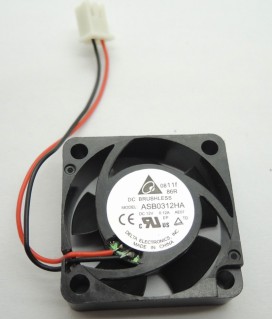
The BFB0312MA fan is an electrical cooling component suitable for various projects, including 3D printers and electronic devices. With an operating voltage of 12V and a current of 0.08A, this fan offers an effective and quiet cooling solution.
Features
- Operating Voltage: 12V DC
- Operating Current: 0.08A
- Dimensions: 30x30x10mm
What it is for
The BFB0312MA fan is ideal for balancing cooling in 3D printers and for electronic projects where space is limited. It can be used to create a custom cooling system for your 3D printer or other electronic devices. Its small size and low power consumption make this fan a versatile option for makers and electronics enthusiasts.
Tutorial: How to Use BFB0312MA 12V Fan
The BFB0312MA 12V fan is ideal for makers who want to add a cooling system to their 3D printer projects or other electronic devices. With dimensions of 30x30x10mm, it is small and versatile, making it perfect for applications where space is limited.
What you need
- Arduino Uno
- Power cable
- Resistor (check the datasheet)
- Potentiometer connector
- Control pin
Steps
- Connect the fan to the Arduino control pin
- Connect the resistor between the control pin and the fan (check the datasheet)
- Connect the potentiometer connector to the resistor
- Write the Arduino sketch to regulate the fan speed
- Check that the fan turns on and off correctly
- Adjust the fan speed using the potentiometer
- Check that the fan works correctly at different speeds
- Install the fan in the desired project
Example code
void setup() {
  pinMode(9, OUTPUT);
}

void loop() {
  analogWrite(9, 128); // Imposta la velocità della ventola
}
Mini project
Create a cooling system for your 3D printer. Connect the fan to the back of the printer and adjust the fan speed based on the device’s temperature.
Common mistakes
- Connect the fan directly to the power pin without a resistor
- Use the wrong resistor
- Do not properly adjust the fan speed
- Do not check that the fan works correctly at different speeds
Recommended accessories
- Arduino Uno
- 3D printer case
- Digital thermometer
- Connector kit
Frequently asked questions
Is the fan compatible with Arduino?
Yes, it is compatible with Arduino and other microcontrollers that support PWM output.
How to adjust the fan speed?
Use the analogWrite() command to adjust the fan speed.
Reviews
There are no reviews yet.