 EN
 IT Italiano
 ES Español
 FR Français
 DE Deutsch
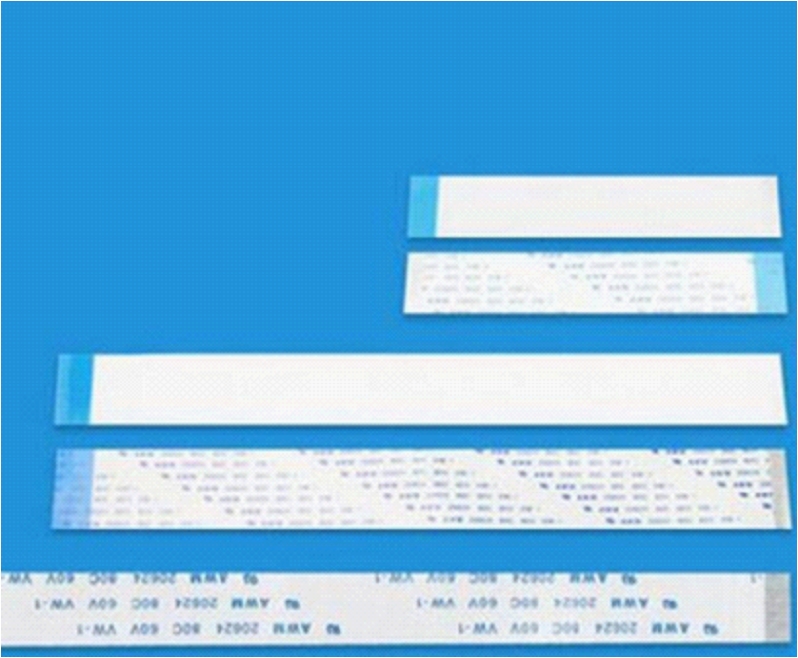
Description
Tutorial: How to Use 20P FFC/FPC Cable 1.0 Step 20 CM
The FFC/FPC 20P cable is an ideal connector for connecting electronic components on small scales, such as LCD screens or sensors, to the main circuit. This cable is particularly useful for makers and developers working on Arduino or Raspberry Pi projects.
What you need
- Arduino or Raspberry Pi
- Component with FFC/FPC connector
Steps
- Check the component’s datasheet to determine the correct pin positions.
- Connect the FFC/FPC cable to the component using the metal part of the connector.
- Connect the other end of the cable to the main circuit or microcontroller.
- Verify the electrical connection with a multimeter to ensure that the contacts are properly established.
Mini project
Connect a small LCD display to an Arduino to create a simple temperature monitor.
Common mistakes
- Do not verify the correct pin position before connection.
- Force the connector without ensuring that the contacts are aligned.
- Do not verify the connection after the connection.
- Use an FFC/FPC cable in environments with high temperature or humidity variations without additional protection.
Recommended accessories
- Separate FFC/FPC connectors
- Multitest
- Printed prototyper
Frequently asked questions
Can the FFC/FPC cable be bent?
Yes, but carefully to avoid damage to the contacts.
What is the recommended maximum length for this type of cable?
Check the product specific datasheet.

Reviews
There are no reviews yet.