 EN
EN IT Italiano
 ES Español
 FR Français
 DE Deutsch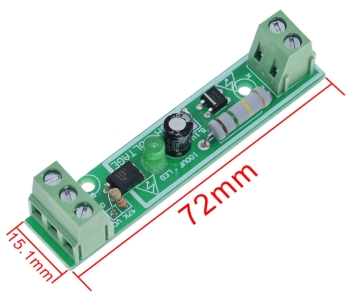
Description
What it is
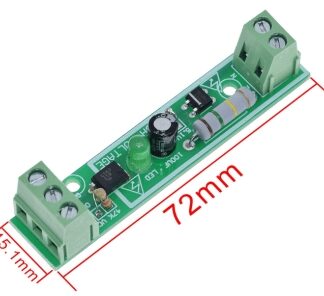
The 220 V AC 1-channel photo coupler module is an electronic component that allows electrical isolation of a circuit from a 220 V AC power line. Using an optical transmission principle, the module transfers the electrical signal without physical contact, ensuring safety and preventing possible electrical shock hazards.
Features
- 1 channel
- 220 V Photo Coupler Isolation
- 220 V Voltage Detection
- PLC Compatible
What it is for
This module is ideal for applications requiring electrical isolation between a circuit and a 220 V power line, such as voltage monitoring systems, home alarms, industrial device control, and much more. PLC compatibility expands its usage possibilities in automatic and control contexts.
Tutorial: How to Use 220V Photo Coupler Module
The 220V optocoupler module is ideal for makers who want to electrically isolate their circuit from 220V power lines. It is particularly useful for monitoring voltage presence in industrial or domestic environments, ensuring safety and data integrity.
What you need
- Arduino Uno or similar
- USB Connection
- 5V Power Supply
Steps
- Connect the optocoupler module to the 220V circuit as specified in the datasheet.
- Connect the module’s output to a digital input of the Arduino.
- Write an Arduino sketch to read the state of the input.
- Verify that the Arduino is correctly reading the state of the module.
- If necessary, adjust the connections to obtain a correct reading.
- Implement the software logic to manage the module’s input.
- Test the system under conditions of 220V voltage presence and absence.
- Document the results and improve the system if necessary.
Example code
void setup() {
  pinMode(2, INPUT);
  Serial.begin(9600);
}

void loop() {
  int stato = digitalRead(2);
  Serial.println(stato);
  delay(1000);
}
Mini project
Create a home security system that monitors electrical power and sends a signal to the phone when 220V voltage is present or absent.
Common mistakes
- Connect the module to incompatible voltage levels.
- Do not properly verify insulation.
- Do not adjust the software to handle the input correctly.
- Do not test the system under real conditions.
Recommended accessories
- Arduino Uno
- USB Connection
- Breadboard
- Universal connection cables
Frequently asked questions
Can the module handle voltages above 220V?
Check the datasheet for the maximum supported voltage.
How can I protect myself while working with 220V?
Always use safety equipment and follow electrical safety instructions.
What other photo coupler modules can I use?
There are photo coupler modules for different voltages and configurations, check the specifications of your project.
Reviews
There are no reviews yet.