 EN
EN IT Italiano
 ES Español
 FR Français
 DE Deutsch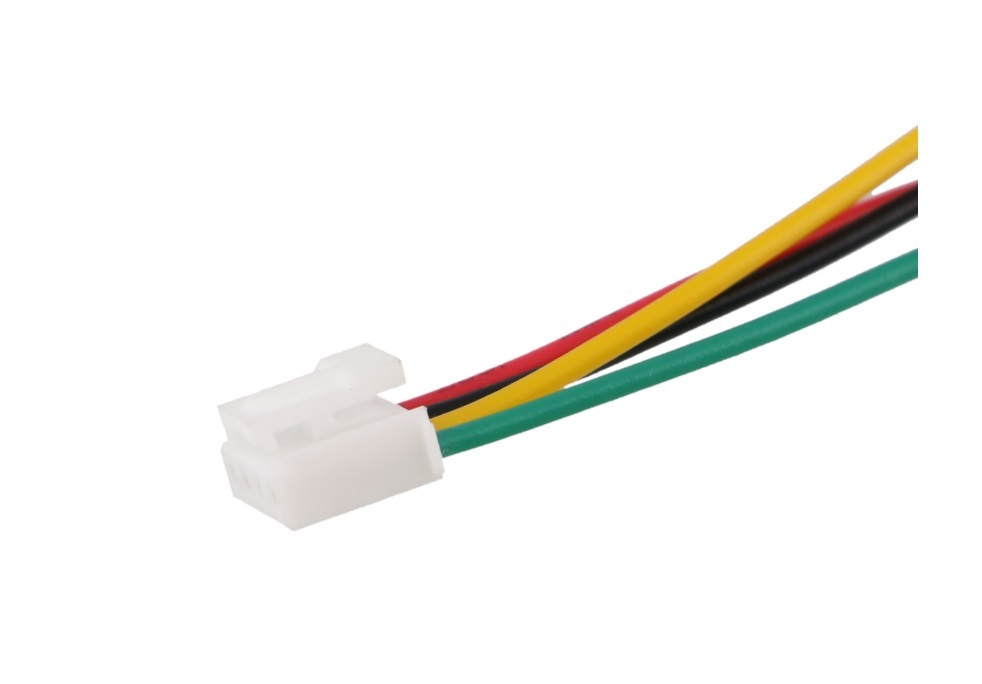
Description
Tutorial: How to use the Grove HY2.0-4P 50CM cable The Grove HY2.0-4P 50CM cable is a very useful connector for Arduino and open-source electronics projects. It allows easy connection between various Grove modules or to a base interface, making installation and maintenance of projects much simpler. Ideal for beginners and experienced makers.
What you need:
Arduino or compatible microcontroller
Grove Modules
Pins for connection
Steps:
Insert the Grove HY2.0-4P 50CM cable into the connector of the source module
Insert the other end of the cable into the connector of the destination module
Check that the connector is fully inserted to avoid short circuits
Repeat steps 1-2 if needed for additional modules
Mini-project: Create an environmental sensor system by connecting a temperature and humidity sensor to an LCD display using Grove HY2.0-4P cables, displaying real-time data on the screen.
Common errors:
Connections not fully inserted
Damaged connector
Cable too long or too short for configuration
Use of incompatible connectors
Recommended accessories:
Grove Base Shield Module
Grove LCD RGB Backlight Module
Grove Temperature and Humidity Sensor
Backup Grove HY2.0-4P cable
Frequently Asked Questions:
What are the dimensions of the cable? The cable has a length of 50 cm.
Can I use these cables with other connectors? Check the datasheet for connector compatibility.
How many cables can be connected together? The maximum number of cables that can be connected depends on the project and circuit configuration.

Reviews
There are no reviews yet.