 EN
EN IT Italiano
 ES Español
 FR Français
 DE Deutsch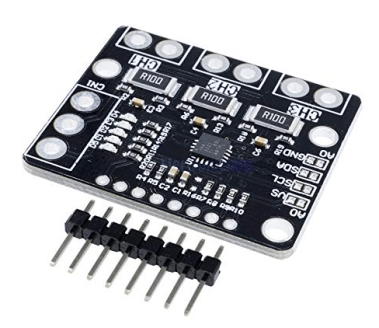
Description
What it is
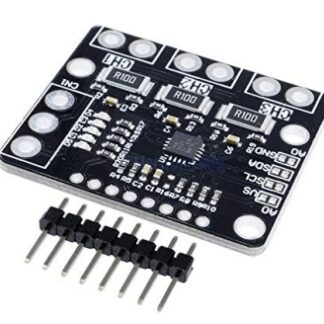
The INA3221 module is an I2C current sensor designed to monitor current output on three power lines, both at low and high levels. It offers a simple and efficient way to measure current flow in electronic and 3D printing applications.
Features
- Current monitoring on three power lines
- I2C communication
- Measurement at both low and high levels
What it is for
The INA3221 module is ideal for monitoring energy efficiency in electronic projects, such as 3D printing systems. It allows monitoring of motor current consumption during prints, providing useful information for optimizing energy efficiency. It is compatible with Arduino and other microcontroller-based platforms that support I2C communication.
Tutorial: How to Use the INA3221 Current Monitoring Module
The INA3221 module is a crucial component for monitoring current on three power lines, both at low and high levels. This module is ideal for makers who want to monitor the energy efficiency of their projects.
What you need
- Arduino Uno or compatible
- I2C Connections
- Separate power supply
Steps
- Connect the INA3221 module to the Arduino using the I2C connectors (SDA and SCL)
- Check that the VCC and GND pins of the module are correctly connected to the power supply
- Install the Adafruit INA3221 library in the Arduino IDE
- Include the library in the Arduino code
- Configure the INA3221 object with the I2C address
- Read and print the current values on three power lines
- Check the datasheet to properly set the control pins (SHDN, POL, SYNC) if necessary
- Monitor the current values in real-time using the Arduino Serial Monitor
Example code
Wire.begin();
#include <Wire.h>
#include <Adafruit_INA219.h>
#include <Adafruit_INA3221.h>

Adafruit_INA3221 ina3 = Adafruit_INA3221(0x40);

void setup() {
  Serial.begin(9600);
  if (!ina3.begin(0x40)) {
    Serial.println("INA3221 non trovato!");
    while (1);
  }
}

void loop() {
  float v = ina3.getBusVoltage_V(1);
  float c = ina3.getCurrent_mA(1);
  Serial.print(v); Serial.print("V");
  Serial.print(c); Serial.println("mA");
  delay(1000);
}
Mini project
Create an energy monitoring system for a 3D printer nozzle. Connect the INA3221 module to the three motors of the nozzle and monitor the current during 3D printing.
Common mistakes
- Do not verify the I2C address of the module correctly
- Do not connect the power pins correctly
- Do not install the necessary library
- Do not configure the control pins correctly
Recommended accessories
- Arduino Uno
- I2C Connections
- Separate power supply
- Temperature sensors
Frequently asked questions
How can I configure the I2C address of the module?
Check the module’s datasheet to set the I2C address correctly through the configuration pins.
Which libraries do I need to install?
Install the Adafruit INA3221 library in Arduino IDE.
Can I use the module to monitor voltage?
Yes, the INA3221 module can monitor both current and voltage.
Reviews
There are no reviews yet.