 EN
EN IT Italiano
 ES Español
 FR Français
 DE Deutsch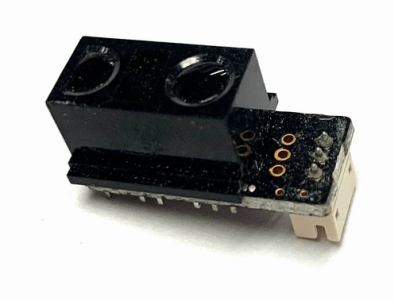
Description
What is the GP2Y0AF30S Proximity Sensor? The GP2Y0AF30S is a 5V electronic component designed to detect objects within a range of 4-30 cm. This sensor is particularly useful for distance measurement projects such as robotics, home security systems, and human-machine interaction prototypes.
Features:
– Power Supply: 5V
– Detection Range: 4-30 cm
– Compatible with Arduino and other microcontrollers
How to use the GP2Y0AF30S Distance Sensor? The sensor is ideal for projects requiring distance measurement within a range of 4-30 cm. It’s perfect for robots, human-machine interaction prototypes, and home security systems.
Tutorial: How to Use the GP2Y0AF30S Distance Sensor
Components Needed:
– Arduino Uno or compatible board
– USB cable
– Connection to computer
– Adafruit_VS1053 Library
Steps:
– Connect sensor pins to the microcontroller (refer to datasheet for specific pin connections)
– Install necessary library (Adafruit_VS1053)
– Write and upload a sketch that reads data from the sensor
– Display distance values on Arduino’s serial monitor
– Calibrate the sensor for accurate measurements
Example Code:
void setup() {
Serial.begin(9600);
}
void loop() {
int distance = getDistance(); // Function to read distance from sensor
Serial.print(“Distance: “);
Serial.println(distance);
delay(1000);
}
Mini-project:
Create a home alarm system that sends a message when an object approaches beyond a certain distance. Takes approximately 30 minutes to complete.
Common Errors:
– Incorrectly connecting sensor pins
– Not installing necessary library
– Not calibrating the sensor
– Failing to add a filter to reduce noise
Recommended Accessories:
– Arduino Uno
– USB cable
– LiPo battery
– LCD display
Frequently Asked Questions:
How do I calibrate the sensor? Calibrate by performing measurements under controlled conditions and adjusting reference values in the code.
Which libraries are required? The Adafruit_VS1053 library is recommended for reading data from the sensor.
Reviews
There are no reviews yet.